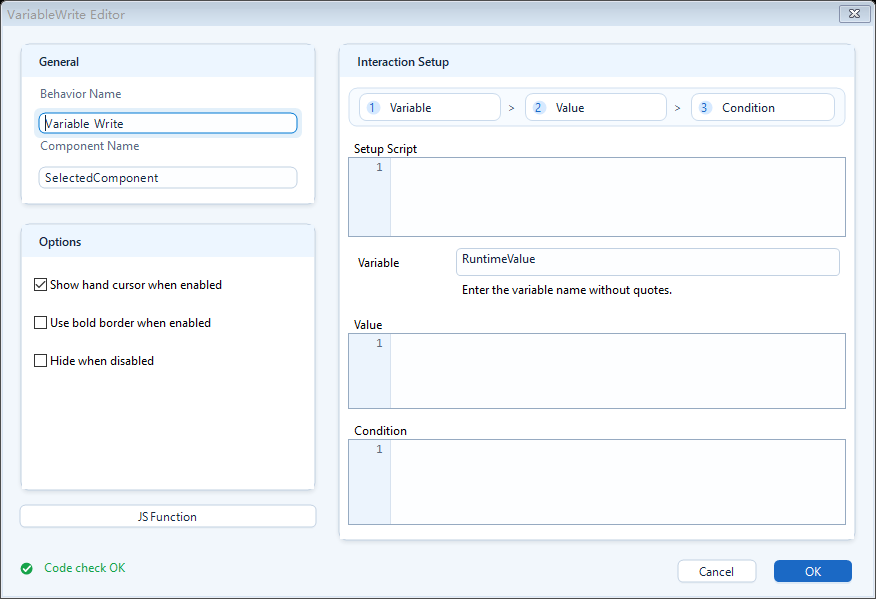
Set Variable on Click is an Interactions behavior. Attach it to a shape, and when the user clicks that shape on the exported page, it writes a value you computed into a runtime variable. Important: it writes a page-internal runtime variable (the JavaScript variable space), not a PLC tag; to send a value to the PLC use Write Tag or Write Tag Bit instead. A runtime variable acts like a small in-page memory slot: hold a toggle state, a selection, or a counter, then let other behaviors on the page (color, visibility, text, rotate, and so on) read that variable to react. It only runs when the user clicks; it never fires on its own while the page is idle.
Interactions
Interactions: Set Variable on Click (点击写变量)
Click a shape to write a runtime variable (a JavaScript variable, not a PLC tag). Use it to pass values inside the page, hold a toggle state, and drive other behaviors.
What it is and what it is for
Set Variable on Click is an Interactions behavior. Attach it to a shape, and when the user clicks that shape on the exported page, it writes a value you computed into a runtime variable. Important: it writes a page-internal runtime variable (the JavaScript variable space), not a PLC tag; to send a value to the PLC use Write Tag or Write Tag Bit instead. A runtime variable acts like a small in-page memory slot: hold a toggle state, a selection, or a counter, then let other behaviors on the page (color, visibility, text, rotate, and so on) read that variable to react. It only runs when the user clicks; it never fires on its own while the page is idle.
How to use it: the editor fields
Fill in the boxes below in the behavior editor. Runtime order is: check Enabled -> run Definition -> evaluate Value -> write the variable -> refresh linked behavior state.
Definition: preparation area. Read tags, define intermediate variables, do calculations for Value here. May be left empty.
Variable: the name of the variable to write; the name only, no quotes (e.g. enter pumpStart, not "pumpStart").
Value: the value to write. It may be a single expression or full JavaScript; if you write multi-line script, you must end it with return.
Enabled: a gate. Click writes only when it returns true; returns false means the click does nothing.
(Optional appearance feedback) show hand cursor when enabled, thicker stroke when enabled, hide when not enabled; visual hints for clickable / not clickable.
// Definition
var nextValue = ReadTagBoolean("PLC1.PUMP.START", false) ? 0 : 1;

// Variable
pumpStart

// Value
nextValue
When to use it
Best when a click should remember a value inside the page and make other elements react to it.
A local toggle button: click to flip pumpStart between 0 and 1, then let an indicator's color behavior read the variable to switch on/off (note this only changes the page variable, it does not actually write the PLC).
In-page view switching: different buttons write viewMode (e.g. 1/2/3), and several layers use visibility behaviors to show or hide based on viewMode.
Remember a selection: write the currently selected device id into a variable for page text, navigation, or scripts to read.
Boundaries and common mistakes
Keep these in mind to avoid traps.
Do not confuse it with Write Tag: this writes a runtime variable and never reaches the PLC; use Write Tag / Write Tag Bit for the PLC.
Do not quote the variable name: Variable takes the bare name (pumpStart); quotes or expressions will fail.
Multi-line Value must return: a single-line expression needs no return, but multi-line logic without return yields no result.
To make other elements react: writing only refreshes linked behavior state; other elements must bind to and read the same variable name (the variable space is readable via hqVisuDesigner.globals).
When Enabled returns false the click writes nothing; if a click seems to do nothing, check Enabled first.
Figure 1: Set Variable on Click editor
Enter the variable name and the value to write; a click writes it to a page runtime variable for other behaviors to react to.