Open another exported page from this PowerPoint file as a popup without navigating away from the underlying page; the popup keeps its own HTML, SVG, JavaScript, and image assets.
Open Page as Popup is a dedicated popup behavior, not a variant of Open Link. It opens another Page Code above the current runtime page and keeps the underlying page in place. Use it for dialogs, device details, confirmations, and parameter panels.
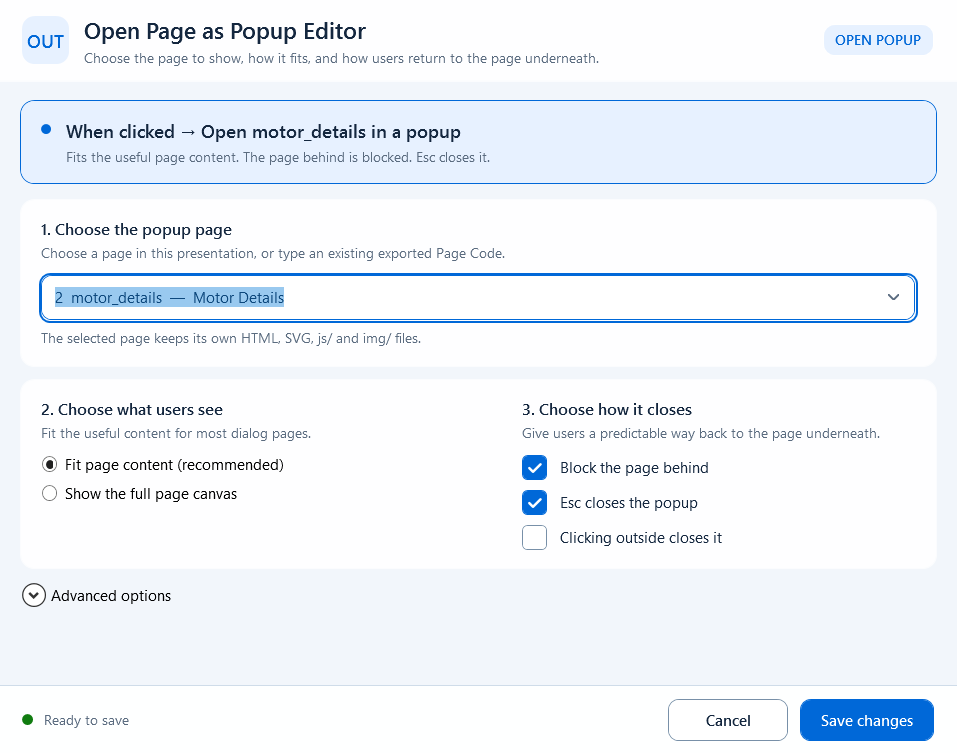
Bind the behavior to the button or shape that opens the popup. The editor presents the outcome in three steps:
- 1. Choose the popup page: select a page in this presentation or type an existing exported Page Code. A Page Code must be a valid export base name.
- 2. Choose what users see: Fit page content (recommended) crops transparent margins and fits the useful content; Show the full page canvas preserves the full exported canvas.
- 3. Choose how it closes: Block the page behind controls modal behavior; Esc closes the popup and Clicking outside closes it configure dismissal. Outside-click dismissal is available only when the page behind is blocked.
- Behavior is active is the binding-level switch. Enabled expression is the runtime gate; hand-pointer and hide-when-disabled options control discoverability.
Prefer a fixed page and fixed parameters. Expand Advanced options only when the destination or parameters must be computed at runtime.
- Use a dynamic Page Code expression: provide a JavaScript expression that returns the Page Code.
- Page parameters (JSON object): pass a static object such as
{"PLC":"PLC_LINE01","Device":"PUMP_01"}. A top-level array is invalid.
- Build page parameters with an expression: return a parameter object from current page or device context.
- Background behind popup: choose Dim the page behind or Keep the page visible. Dim strength is limited to 0%-85%.
- Allow the same popup to open more than once: permit duplicate instances. It is off by default to avoid accidental duplicates.
// Fixed page + static parameters
Page Code: device_details
Page parameters: {"PLC": "PLC_LINE01", "Device": "PUMP_01", "active": true}

// Dynamic page example
selectedDeviceType === "pump" ? "pump_details" : "valve_details"
Popup parameters differ from Open Link's ordered parameter list: the popup editor requires an object, so it cannot represent repeated keys. For consistent host and local-fallback behavior, use string, number, boolean, or null values. The popup destination still reads them with GetPageParameter, GetPageParameterValues, or GetPageParameters and treats the result as text.
- Static parameters: enter a JSON object.
- Dynamic parameters: Build page parameters with an expression must return an object, not an array, Promise, or DOM object.
- Destination reads: call GetPageParameter* in the popup page's Page Script.
- Close result: Close Current Popup's Result expression sends a result back to the opener; it is not a page query parameter.
- Parameters provide page context only; they do not bypass host permissions or expand Tag access.
// Popup Page Script
var plc = GetPageParameter("PLC", "");
var device = GetPageParameter("Device", "");
var activeText = GetPageParameter("active", "false");
var active = activeText === "true";
The popup target is still an exported page in the screen package. After adding, deleting, or renaming a popup page, or changing shared assets, perform a full-package export; exporting only the opener page is insufficient. Do not emulate an in-page popup with Open Link, and prefer selecting a page so the Page Code stays aligned with the export manifest.