Hover Script is a behavior in the Interactions category. It lets you attach two pieces of JavaScript to a shape: one runs when the pointer enters the shape, the other when the pointer leaves. Use it for lightweight visual feedback such as hover highlighting, temporary hints, or emphasizing the device the user is pointing at. Like Click Script, it only runs in the exported HQ VISU page when the user actually interacts with the mouse; it does not fire while you edit the slide in PowerPoint. Note there is no automatic revert: whatever you change on enter, you must change back on leave.
Interactions
Interactions: Hover Script
Bind JavaScript that runs on mouse over and mouse out of a shape: Pointer Enter for highlight/hint effects, Pointer Leave to restore. Runs only on real pointer interaction in the exported page.
What it is and what it is for
Hover Script is a behavior in the Interactions category. It lets you attach two pieces of JavaScript to a shape: one runs when the pointer enters the shape, the other when the pointer leaves. Use it for lightweight visual feedback such as hover highlighting, temporary hints, or emphasizing the device the user is pointing at. Like Click Script, it only runs in the exported HQ VISU page when the user actually interacts with the mouse; it does not fire while you edit the slide in PowerPoint. Note there is no automatic revert: whatever you change on enter, you must change back on leave.
How to use it: the fields in its editor
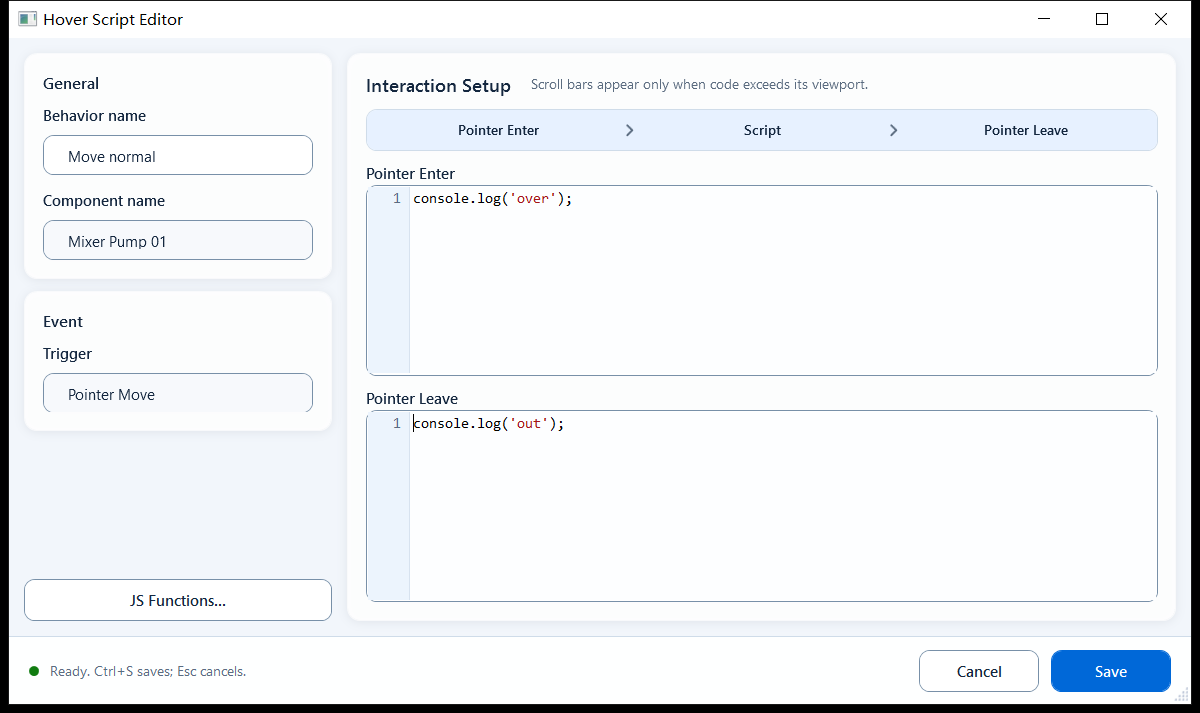
Select the shape and open the Hover Script behavior editor. The Trigger is fixed and shows Pointer Move. Both boxes are full script-body slots: multi-line logic, ReadTag*, and async APIs such as setTimeout/fetch are allowed, but device writes do not belong in hover actions:
Pointer Enter (mouse over; called Mouse Over in the docs): script that runs when the pointer enters the shape.
Pointer Leave (mouse out; called Mouse Out in the docs): script that runs when the pointer leaves, used to undo what the enter script changed.
Context objects available in the script: object, objects, event (mouse context) plus tag, page, presentation, shape, hqVisuDesigner, and globals.
object is the current shape's DOM element, so you can set its style directly (e.g. object.style.opacity); shape.name is the shape name.
Note: Hover Script has no Enable/Condition gate (unlike Click Script); both scripts simply run.
Best for purely presentational mouse feedback that hints to the user without requiring a click.
Device-icon hover highlight: dim the opacity or add a stroke when the pointer is over a pump/valve, restore on leave, to signal it is clickable.
Temporary info hint: on enter use hqVisuDesigner to show a note or emphasis border on the page, clear it on leave, without interrupting the operator.
Boundaries and common mistakes
A few things that genuinely trip people up:
Enter changes are not auto-undone: you must write the matching restore logic in Pointer Leave, or the effect stays after the pointer leaves.
It runs only on real pointer interaction in the exported/host page, not in PowerPoint edit mode, so verify after export.
Do not call WriteTag* from Hover Script. The runtime grants write capability only to trusted click or Pointer Button press/release actions; keep hover purely visual.
Figure 1: Hover Script editor
Fill the Pointer Enter and Pointer Leave scripts separately; the leave script restores what the enter script changed.