Open Diagnosis is an Interactions-category behavior that runs only on the exported, running page when the user clicks the shape. It asks the HQ VISU host to open its device diagnosis popup, so an operator can click a device icon on a screen and bring up that device's diagnosis/status window. The behavior does not draw a window itself; it hands a small payload to the host, and the host opens the diagnosis view using its own popup template. Note: it relies on the host popup protocol, so it only works when the page runs inside the HQ VISU host. Opening the exported file directly in a plain browser will not show the diagnosis popup.
Interactions
Interactions: Open Diagnosis
An Interactions click behavior: when the user clicks the shape, it asks the HQ VISU host to open its device diagnosis popup, jumping from the screen to that device's live diagnosis view.
What it is and what it's for
Open Diagnosis is an Interactions-category behavior that runs only on the exported, running page when the user clicks the shape. It asks the HQ VISU host to open its device diagnosis popup, so an operator can click a device icon on a screen and bring up that device's diagnosis/status window. The behavior does not draw a window itself; it hands a small payload to the host, and the host opens the diagnosis view using its own popup template. Note: it relies on the host popup protocol, so it only works when the page runs inside the HQ VISU host. Opening the exported file directly in a plain browser will not show the diagnosis popup.
How to use it: the editor fields
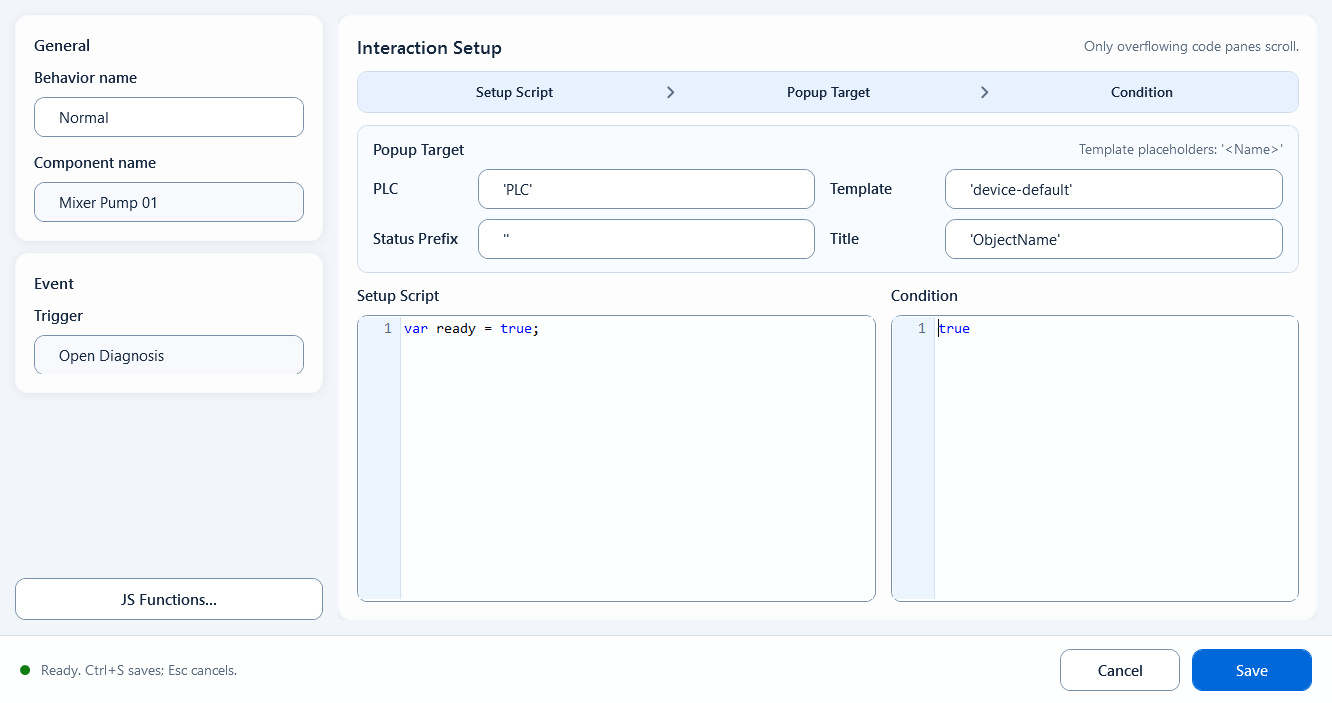
In the behavior editor, besides the shared Definition and Condition, you fill in the Popup Target group. These four target fields are JavaScript string expressions (use a literal, or build a value dynamically). The labels shown in the editor map to the payload field names the host receives as follows:
Definition: setup logic. Read tags or define variables here for the fields below to use (e.g. var dev = 'F01';).
PLC: the target PLC / station name (payload PLC). Default 'PLC'.
Template (payload ID): the diagnosis popup identifier; the popup title normally shows this ID. Default 'device-default'.
Status Prefix (payload DiagnosisControl): the host popup template name, deciding which diagnosis template opens. Default '' (empty).
Title (payload GroupRightIndex): a tag-tree prefix, not the full tag name; the host appends the template's suffix to build the final tag. Default 'ObjectName'.
Condition (payload Enabled): the run gate; true runs the behavior, false means a click does nothing. Default true.
Template instances may use string placeholders such as '<PLC>', '<MUBAN>', '<STATUS_PREFIX>', and '<TITLE>'; the instance replaces them during export.
// Definition
var deviceId = 'PUMP_01';

// Target fields (string expressions)
PLC:           'PLC_LINE01'
Template(ID):  deviceId     // popup title shows PUMP_01
Status Prefix(DiagnosisControl): 'device-default'
Title(GroupRightIndex):          'AREA01.PUMP01'   // prefix only
Condition(Enabled):              true

// At runtime this is equivalent to:
hqVisuDesigner.openDiagnosis({
  PLC: 'PLC_LINE01', ID: 'PUMP_01',
  DiagnosisControl: 'device-default',
  GroupRightIndex: 'AREA01.PUMP01'
});
When to use it
Typical case: on a device-overview or process screen, bind Open Diagnosis to each pump, valve, or motor icon so an operator can click an icon and pop up that device's diagnosis/status window to check live bits, alarms, and parameters without switching to a dedicated diagnosis page. You can also drive the target dynamically from Definition, e.g. build the ID and prefix from the currently selected device number so one template serves many devices.
Boundaries and common mistakes
A few things to watch for:
Title / GroupRightIndex is only a tag-tree prefix, not the full tag name. The host builds the final tag as PLC + prefix + the template's suffix, e.g. PLC_LINE01 + AREA01.PUMP01 + RUN gives PLC_LINE01.AREA01.PUMP01.RUN; putting a full tag in the prefix produces a wrong tag.
The editor labels (Template / Status Prefix / Title) are not the same words as the payload names (ID / DiagnosisControl / GroupRightIndex); use the mapping above when debugging.
The four target fields are string expressions: quote literals (e.g. 'PLC1'); only use a bare name for a variable (e.g. dev).
If Condition / Enabled is false, a click does nothing; check it first when 'clicking opens no popup'.
The popup is opened by the host, so it only works if the host has the matching diagnosis template (DiagnosisControl) configured; it has no effect outside the HQ VISU host.
Figure 1: Open Diagnosis editor
Fill the target fields - PLC, Template, Status Prefix, Title - so a click asks the host to open the device diagnosis popup.