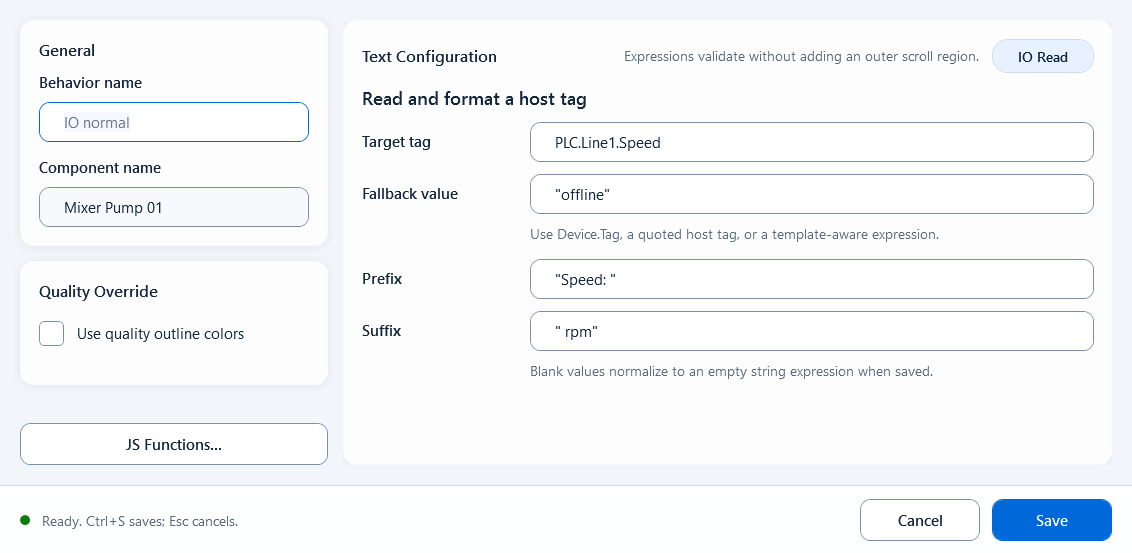
Tag Text (in the Text behavior category; legacy name IO Read) displays the value of a single tag directly as text. It is the no-code counterpart to Script Text: when you only want to show one tag as-is, with no string building or calculation, this is the simplest choice and needs no script. After you bind Tag Text to a text box or shape, the runtime reads the tag you point at, wraps it with a prefix and suffix, and displays it; for example showing a temperature tag as "Temperature: 36.5 °C".
Text
Text: Tag Text
Tag Text shows a single tag's value as text with no scripting; you just fill in the tag expression and default value, plus optional prefix, suffix, and quality border.
What it is and what it's for
Tag Text (in the Text behavior category; legacy name IO Read) displays the value of a single tag directly as text. It is the no-code counterpart to Script Text: when you only want to show one tag as-is, with no string building or calculation, this is the simplest choice and needs no script. After you bind Tag Text to a text box or shape, the runtime reads the tag you point at, wraps it with a prefix and suffix, and displays it; for example showing a temperature tag as "Temperature: 36.5 °C".
How to use it: the editor fields
Double-click the Tag Text behavior node under the component to open its editor, then fill in these fields:
Tag Expression: the tag to display, written as a quoted string expression, e.g. "PLC_LINE01.OVEN01.TEMPERATURE". Device.TAGNAME is only the editor's initial format cue and must be replaced with an actual project tag before saving.
Default Value: the fallback text shown when the tag has no value; defaults to an empty string.
Prefix: text placed before the value, e.g. "Temperature: ".
Suffix: text placed after the value, e.g. " °C".
Quality Border: optional toggle. When on, the border uses the GOOD color (default #000000) while communication quality is good, and the BAD color (default #FF8800) when quality is bad.
Tag Expression: "PLC_LINE01.OVEN01.TEMPERATURE"
Default Value:   ""
Prefix:          "Temperature: "
Suffix:          " °C"
// At runtime: Temperature: 36.5 °C
When to use it
Use it whenever one tag should be shown as text as-is, with no logic or formatting:
Show a measured value (temperature, pressure, level, flow) with its unit directly on the screen.
Display a string tag such as a device operating-mode name or batch number.
If the text needs multiple tags, conditional logic, or formatting, use Script Text instead.
Boundaries and common mistakes
Tag Expression, Default Value, Prefix, and Suffix are JavaScript expressions, not plain text boxes; so tags and literal text must be quoted: write the tag as "PLC_LINE01.OVEN01.TEMPERATURE" and the prefix as "Temperature: ". Entering a bare tag path without quotes (e.g. PLC_LINE01.OVEN01.TEMPERATURE) is evaluated as an expression and will not display. Also note that Quality Border reflects communication quality (good / bad), not the process value itself and not an alarm state.
Figure 1: Tag Text editor
Fill the tag expression, default value, and optional prefix/suffix to show a single tag's value as text.