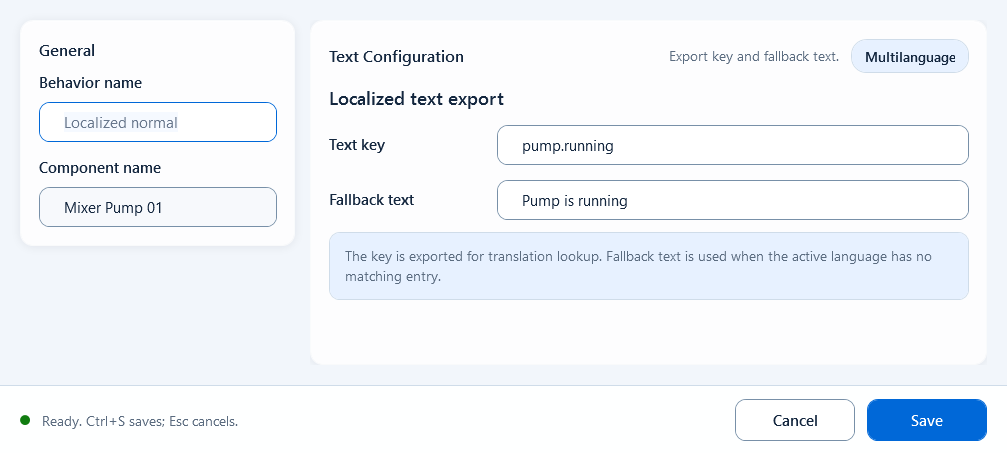
Localized Text is one of HQ VISU's Text behaviors, attached to a text shape from the Behavior Browser. Instead of showing fixed text, it shows the translation of a language key: at runtime it takes the current language, looks the key up in the global translation table, and displays that text. When the language is switched, every shape using this behavior updates automatically, so you don't build a separate page per language. It fits on-screen text that is fixed in meaning but must change with language, such as button labels, titles, status messages, and menu items.
Text
Text: Localized Text
Binds a text shape to a language key (Text Key); at runtime it shows the translation for the current language, falling back to Default Text and then to the key itself. Use it for buttons, titles, status text, and menus that must follow the selected language.
What it is and what it's for
Localized Text is one of HQ VISU's Text behaviors, attached to a text shape from the Behavior Browser. Instead of showing fixed text, it shows the translation of a language key: at runtime it takes the current language, looks the key up in the global translation table, and displays that text. When the language is switched, every shape using this behavior updates automatically, so you don't build a separate page per language. It fits on-screen text that is fixed in meaning but must change with language, such as button labels, titles, status messages, and menu items.
How to use it: the editor fields
Add a Localized Text behavior to a text shape in the Behavior Browser. The editor has just two fields (it is pure table lookup, no script and no Quality Border):
Text Key: the language key, e.g. pump.start. At runtime this key is looked up in the global translation table for the current language.
Default Text: the fallback text shown when the key is not found in the table (also usable as a design-time placeholder).
Fallback order: 1) translation from the current language pack, 2) Default Text, 3) the key itself (meaning no translation matched).
Export note: the editor warns that text is flattened to one line, so multi-line content is collapsed.
Text Key:     pump.start
Default Text: Start
When to use it
Use it when one screen must support several languages without duplicating the page per language. Typical scenarios:
A Start button bound to one Text Key (e.g. pump.start): shows 'Start' in English, '启动' in Chinese, from the same shape.
Screen titles, device-status text, and navigation menu items all driven by language keys, so switching the runtime language updates them all at once.
Boundaries and common mistakes
A translation only appears if the Text Key actually exists in the global translation table and the current language has been switched correctly; otherwise it falls back to Default Text, and a misspelled key will even show the raw key on screen. Also note: the field here is called Text Key, which is a different entry point from the per-shape Language Settings dialog (Enable language binding / Language Key); don't configure both for the same thing. The runtime language is switched by the host; you can drive it with hqVisuDesigner.useLanguage(...) plus hqVisuDesigner.notifyLanguageChange() to refresh.
Figure 1: Localized Text editor
Bind a text shape to a language key so the runtime shows the translation for the current language, falling back when not found.