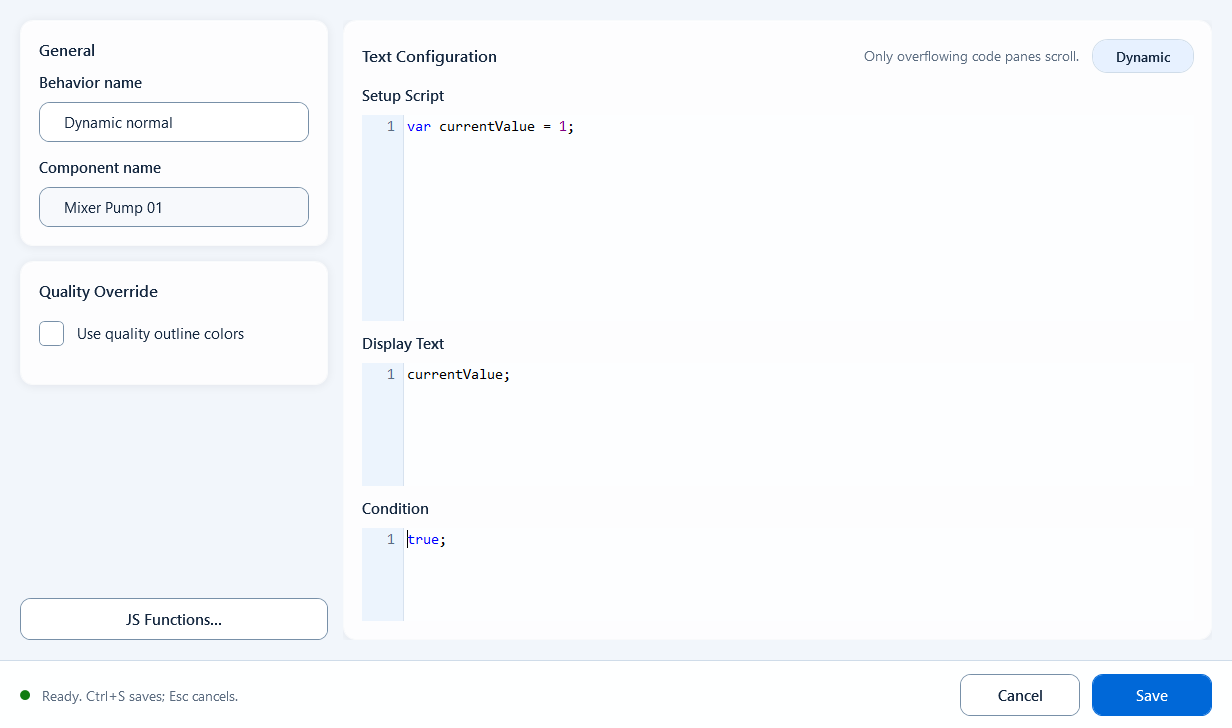
Script Text is one of the Text behaviors. It lets you decide a component's displayed text with a short piece of JavaScript. Instead of showing one tag's raw value, you read one or more tags, compute and decide, then assemble the result into a complete string. Use it when you need units, decimal places, or several values combined into one line. If you only need to show a single tag as-is, Tag Text is simpler.
Text
Text: Script Text
Build a component's final displayed text with a script: read tags and compute in Definition, then return the string to show in Text. Best for dynamic text that needs units, formatting, or several values combined.
What it is and what it is for
Script Text is one of the Text behaviors. It lets you decide a component's displayed text with a short piece of JavaScript. Instead of showing one tag's raw value, you read one or more tags, compute and decide, then assemble the result into a complete string. Use it when you need units, decimal places, or several values combined into one line. If you only need to show a single tag as-is, Tag Text is simpler.
How to use it: fields in the editor
Script Text has four main fields. Definition prepares data (read tags, define variables, compute intermediate values); Text returns the final string to display. Text is an expression position: return a single value and do not put async code such as fetch/setTimeout there.
Text: output. Return the final string to display (a single value).
Active: whether this text behavior is in effect (enable/disable it).
Quality Border: color the border by communication quality; GOOD color when quality is good, BAD color when bad; this quality means link health only, not the process value or alarm state.
// Definition
var pressure = ReadTagDouble("PLC_LINE01.AIR01.PRESSURE", 0.0);

// Text
"Pressure: " + pressure.toFixed(1) + " bar"
When to use it
Use it when one text box must show processed, dynamic information.
Show a measurement with units and fixed decimals, e.g. "Pressure: 3.2 bar".
Combine several tags into one line, e.g. "Pump1 RUN / Speed 1450 rpm".
Output different wording by condition, e.g. "Running" when on, "Stopped" when off.
Gotchas
The Text field is an expression position that returns a single value, not a full script.
Do not put fetch, setTimeout, or other async code in Text; it needs an immediate value; put such logic in a script body like Page Script/Click Script.
Keep heavy reads and calculations in Definition; let Text only do the final assembly.
Always read tags with a quoted tag name and a fallback, e.g. ReadTagDouble("PLC_LINE01.AIR01.PRESSURE", 0.0); avoid bare tag-like text.
Quality Border reflects communication quality (good/bad) only; do not treat it as a process judgement.
Figure 1: Script Text editor
Read tags and compute in Setup Script, then return the final string to display in Display Text.