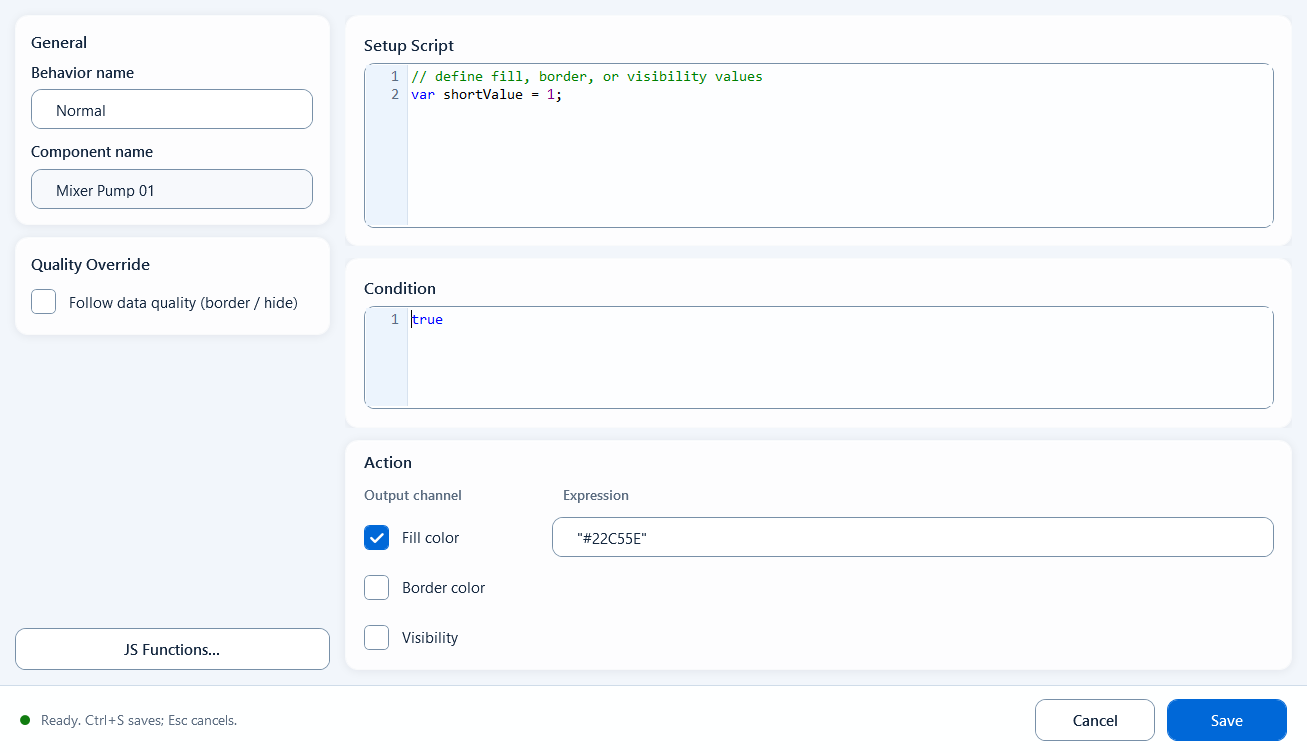
Script Color is a behavior in the Visual States category. It lets you use one piece of JavaScript to drive a single component's fill color, border color, and visibility together, with all three output channels computed by your script. Reach for it when color is not a plain true/false switch (use State Color for that) but instead depends on several tags, numeric ranges, or combined conditions. The editor window is titled Color Script Editor.
Colors
Colors: Script Color
Drive a component's fill, border, and visibility from one script. Use it when the color logic is more complex than a simple true/false switch.
What it is and what it is for
Script Color is a behavior in the Visual States category. It lets you use one piece of JavaScript to drive a single component's fill color, border color, and visibility together, with all three output channels computed by your script. Reach for it when color is not a plain true/false switch (use State Color for that) but instead depends on several tags, numeric ranges, or combined conditions. The editor window is titled Color Script Editor.
How to use it: the editor fields
After binding the behavior (drag it from the right onto a component node on the left), double-click to open the editor and fill in these areas:
General: behavior name; component name is read-only, just to confirm the bound target
Setup Script (the Definition prep area): read tags, declare variables, compute intermediate values; its hint reads "define fill, border, or visibility values"
Condition: an enable expression, defaults to true; the behavior only applies its colors when this is true
Output Channels: three channels - Fill Color, Border Color, Visibility - each with its own Expression box and its own checkbox; only checked channels are applied
Fill Color returns a color string, default "#22C55E"; Border Color returns a color string, default "#000000"; Visibility returns true/false
Quality Override: enable Quality Border to outline with the GOOD color on good quality and the BAD color on bad quality; you can also enable "Hide when quality is BAD" to hide the component when communication quality is bad
// Setup Script (Definition)
var state = ReadTagInteger("PLC_LINE01.PUMP01.STATE", 0);
var MyFillcolor = state === 1 ? "#22C55E" : "#EF4444";
var MyStrokecolor = "#000000";
var MyVisibility = true;

// Fill Color expression: MyFillcolor
// Border Color expression: MyStrokecolor
// Visibility expression: MyVisibility
When to use it
Use it when one component needs several visual effects driven by script at once, or when the color depends on a combination of tags or conditions. Two concrete cases:
Pump status block: change fill and border together from a run tag and an alarm tag, hiding or flashing the block on alarm
Multi-tag combined state: color must be decided from several numeric and boolean values that a single State Color or Range Color cannot express
Boundaries and common mistakes
A few easy traps:
Script Color is a synchronous evaluation slot that needs an immediate value: do not put async code such as fetch(), setTimeout, or setInterval in the expressions; put that logic in Setup Script
Keep multi-line logic, tag reads, and function definitions in Setup Script; the three Output Channel expressions should only return the final result
An output channel's expression only applies when its checkbox (Fill/Border/Visibility) is checked; unchecked channels are ignored
Quality Border and "Hide when quality is BAD" act on communication quality (good/bad), not the process value itself; when quality is bad the component should not keep showing as if the value were still valid
Figure 1: Script Color editor
Drive fill color, border color, and visibility together from one script across the three output channels.