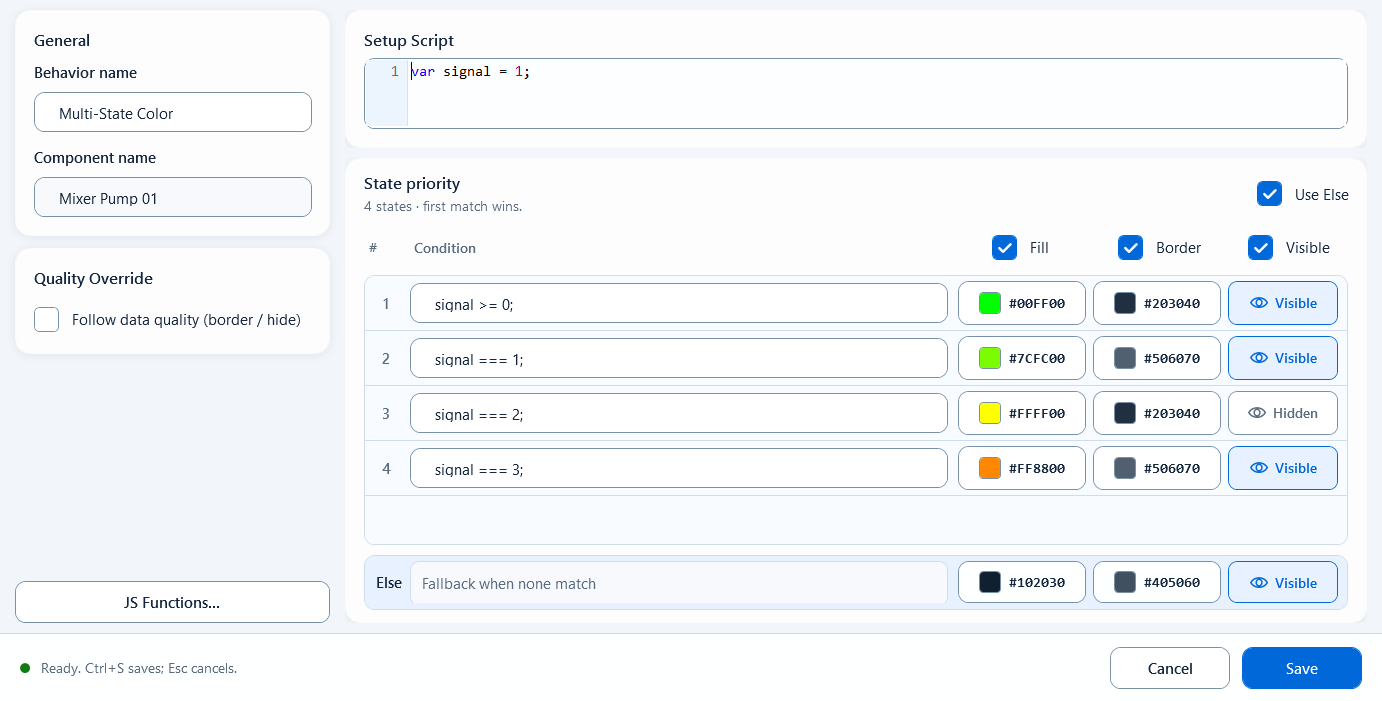
Check up to 8 conditions in order and apply the first true row’s fill, border and visibility. Use for prioritized states such as alarm, manual, auto and idle.
ColorsDocumentation revised: 2026-10-21
Colors: Multi-State Color
Check up to 8 conditions in order and apply the first true row’s fill, border and visibility. Use for prioritized states such as alarm, manual, auto and idle.
Overview
Multi-State Color displays several states by priority. Configure up to eight Boolean conditions; at runtime, the first true row supplies the component's fill, border, and visibility settings. Row 1 has the highest priority. Use Else for a default appearance when no condition is true.
Field configuration
Arrange conditions by priority, top to bottom. Enable output channels and set each row’s action.
Setup Script (optional): preparation area to read tags and define helper values; leave it empty if not needed.
Conditions (1-8): one true/false expression per row; the row number is its priority, row 1 highest, and the runtime uses the first row that is true.
Use Else: when checked, adds an Else row at the bottom of the condition list, used when no condition is true.
Fill (enable via the column header): set one fill color for each state row.
Border (enable via the column header): set one border color for each state row.
Visible (enable via the column header): set show or hide for each state row.
Quality Override: enable Follow data quality (border / hide) and configure Good and Bad border colors. Enable Hide when quality is bad to hide the component on invalid data.
Use it when one component must show three or more mutually exclusive operating states that have a clear priority.
Pump/device status lamp: alarm shows red first, then manual orange, then auto-running green, then idle grey.
Multi-level run state: stopped / low speed / high speed / fault on a single shape switched by priority, instead of stacking several behaviors.
Common mistakes
Check priority and unmatched-state handling:
Order decides the result: the first true condition wins, so put the more important state (e.g. alarm) earlier or an earlier true condition will steal it.
Conditions are expressions, not colors: a condition row only returns true/false; colors are set in the action columns, and an empty condition is treated as false.
None true with no Else: this behavior leaves the component unchanged; enable Use Else if you need a fallback.
Enable the channel in the header first: if Fill / Border / Visible is unchecked, that column has no effect on any row.
Quality is communication quality: Quality Border reflects tag comms, not the process value; do not keep showing a valid-looking state when quality is bad.
Figure 1: Multi-State Color editor
Rank up to 8 conditions by priority; the first true one wins and applies that row's fill, border, and visibility.