Rotate a component around a chosen pivot by an input angle, for pointers, valve plates and fan blades.
GeometryDocumentation revised: 2026-10-21
Geometry: Rotate
Rotate a component around a chosen pivot by an input angle, for pointers, valve plates and fan blades.
Overview
Drag Geometry → Rotate onto the component. It applies the supplied angle directly without percentage mapping.
How to use it: every control in the editor
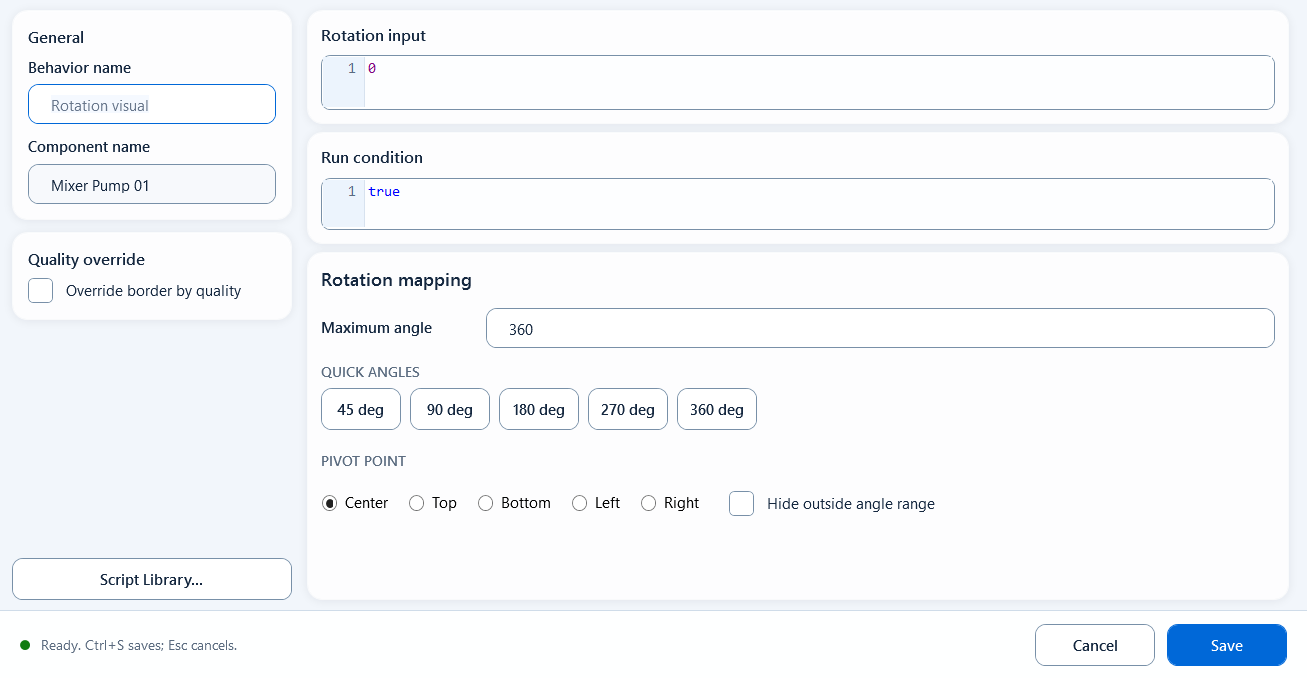
Rotation input returns an angle in degrees. Maximum angle defines a symmetric allowed range and PIVOT POINT sets the pivot. Rotate does not perform source-range percentage mapping.
Behavior name is editable; Component name is read-only.
Override border by quality configures Good / Bad borders for data quality.
JS functions... inserts a method into the focused expression field.
Rotation input: an angle expression, such as ReadTagDouble("PLC_LINE01.VALVE01.ANGLE", 0).
Condition: a boolean; false skips rotation and does not hide the component.
Maximum angle defaults to 360. A value of 90 permits -90° to +90°. Preset buttons enter 45, 90, 180, 270, or 360.
PIVOT POINT: Center, Top, Bottom, Left, or Right, according to the mechanical pivot.
Hide outside angle range hides an out-of-range angle; otherwise the angle is clamped to the boundary.
Save / Ctrl+S validates and saves; Cancel / Esc discards the edit.
TextText
// Rotation inputReadTagDouble("PLC_LINE01.VALVE01.ANGLE", 0)// Maximum angle: 90// PIVOT POINT: Center
When to use it
Use it for angle-driven motion, for example:
Gauge pointer: read the angle for the pressure/temperature value and turn the needle around its center
Valve angle: rotate the valve icon by its opening angle, with the pivot on the real stem center
Fan / mixer blade: rotate the blade by its running angle to show motion
Limitations and troubleshooting
Check these limits:
Rotation input uses degrees. Convert an opening percentage explicitly when the Tag is not an angle.
Match the pivot to the mechanical axis. Use Bottom for a bottom-hinged pointer and Center for a center-mounted component.
Angle presets only update Maximum angle, not Rotation input.
A false Condition only skips rotation. Use the hide option or a separate visibility behavior to control visibility.
Figure 1: Rotate editor
Apply an angle value to the component so it turns around the chosen pivot, with a max-rotation limit.