Drive a component's fill, border, and visibility from one script. Use it when the color logic is more complex than a simple true/false switch.
ColorsDocumentation revised: 2026-10-21
Colors: Script Color
Drive a component's fill, border, and visibility from one script. Use it when the color logic is more complex than a simple true/false switch.
Overview
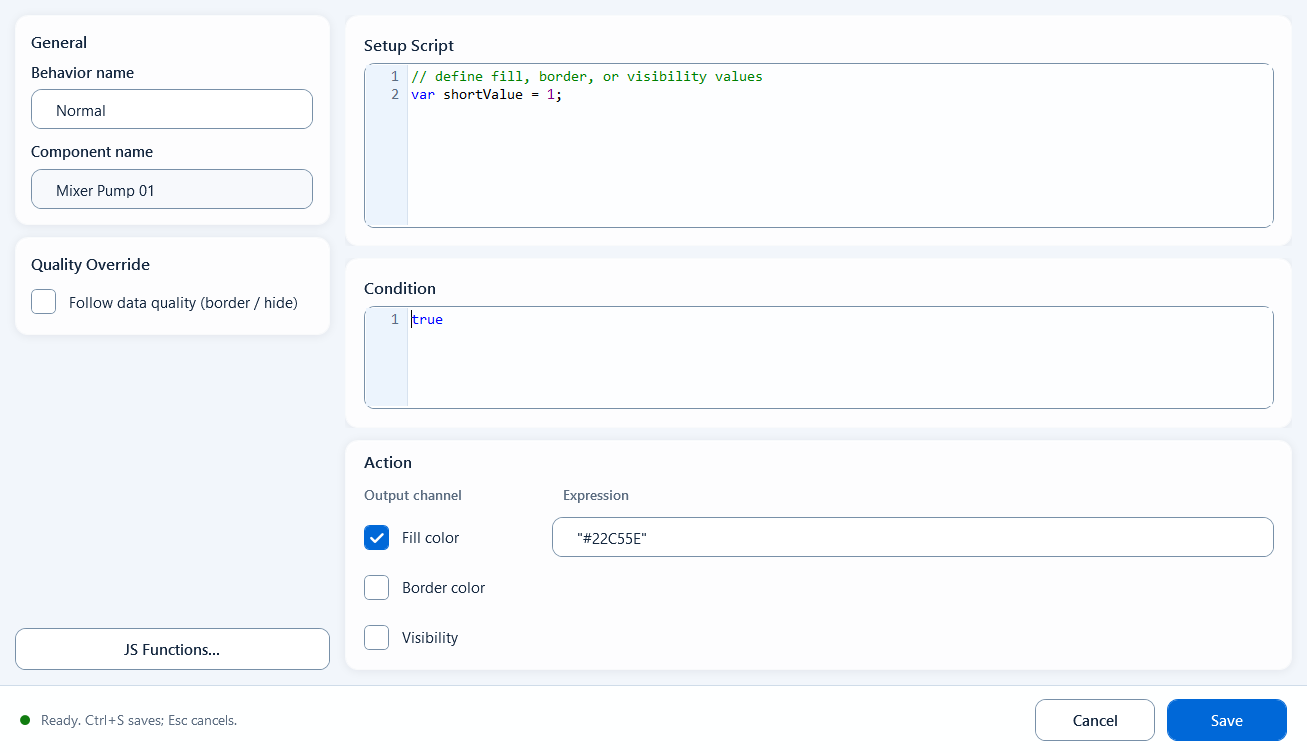
Script Color computes one component's fill, border, and visibility from JavaScript expressions. Use it when the appearance depends on several Tags or combined conditions. Open Color Script Editor to configure the output channels.
Field configuration
Open the bound behavior and configure these fields:
General: behavior name; component name is read-only, just to confirm the bound target
Setup Script: read tags, declare variables, compute intermediate values; its hint reads "define fill, border, or visibility values"
Condition: an enable expression, defaults to true; the behavior only applies its colors when this is true
Output Channels: three channels - Fill Color, Border Color, Visibility - each with its own Expression box and its own checkbox; only checked channels are applied
Fill Color and Border Color return color strings; Visibility returns true/false. A new behavior refers to MyFillcolor, MyStrokecolor, and MyVisibility from Setup Script. Keep the output expressions aligned when changing that script
Quality Override: enable Follow data quality (border / hide) and configure Good and Bad border colors. Enable Hide when quality is bad to hide the component on invalid data.
JavaScriptJavaScript
// Setup Scriptvar state = ReadTagInteger("PLC_LINE01.PUMP01.STATE", 0);var fillColor = state === 1 ? "#22C55E" : "#EF4444";var borderColor = "#000000";var isVisible = true;// Fill Color expression: fillColor// Border Color expression: borderColor// Visibility expression: isVisible
When to use it
Use scripts for multiple visual channels or combined conditions, for example:
Pump status block: change fill and border together from a run tag and an alarm tag, hiding or flashing the block on alarm
Multi-tag combined state: color must be decided from several numeric and boolean values that a single State Color or Range Color cannot express
Limitations and troubleshooting
Check these conditions before saving:
Script Color output expressions must return synchronously. Handle asynchronous data in an async Page Script function or user interaction script, then store the result in a page variable for the expression to read.
Keep multi-line logic, tag reads, and function definitions in Setup Script; the three Output Channel expressions should only return the final result
An output channel's expression only applies when its checkbox (Fill/Border/Visibility) is checked; unchecked channels are ignored
The quality border and Hide when quality is bad use communication quality (good/bad), not the process value or alarm state.
Figure 1: Script Color editor
Drive fill color, border color, and visibility together from one script across the three output channels.