Set, reset or toggle a selected bit of an integer Tag on click. Configure the parent Tag, bit index and action; the runtime platform performs the write.
InteractionsDocumentation revised: 2026-10-21
Interactions: Write Tag Bit
Set, reset or toggle a selected bit of an integer Tag on click. Configure the parent Tag, bit index and action; the runtime platform performs the write.
Overview
Set makes the bit 1, Reset makes it 0, and Toggle reverses it. The runtime computes an integer from the current value and submits it with the bit index and action. Concurrent changes depend on host and device write handling. Add State Color or Tag Text to display the bit.
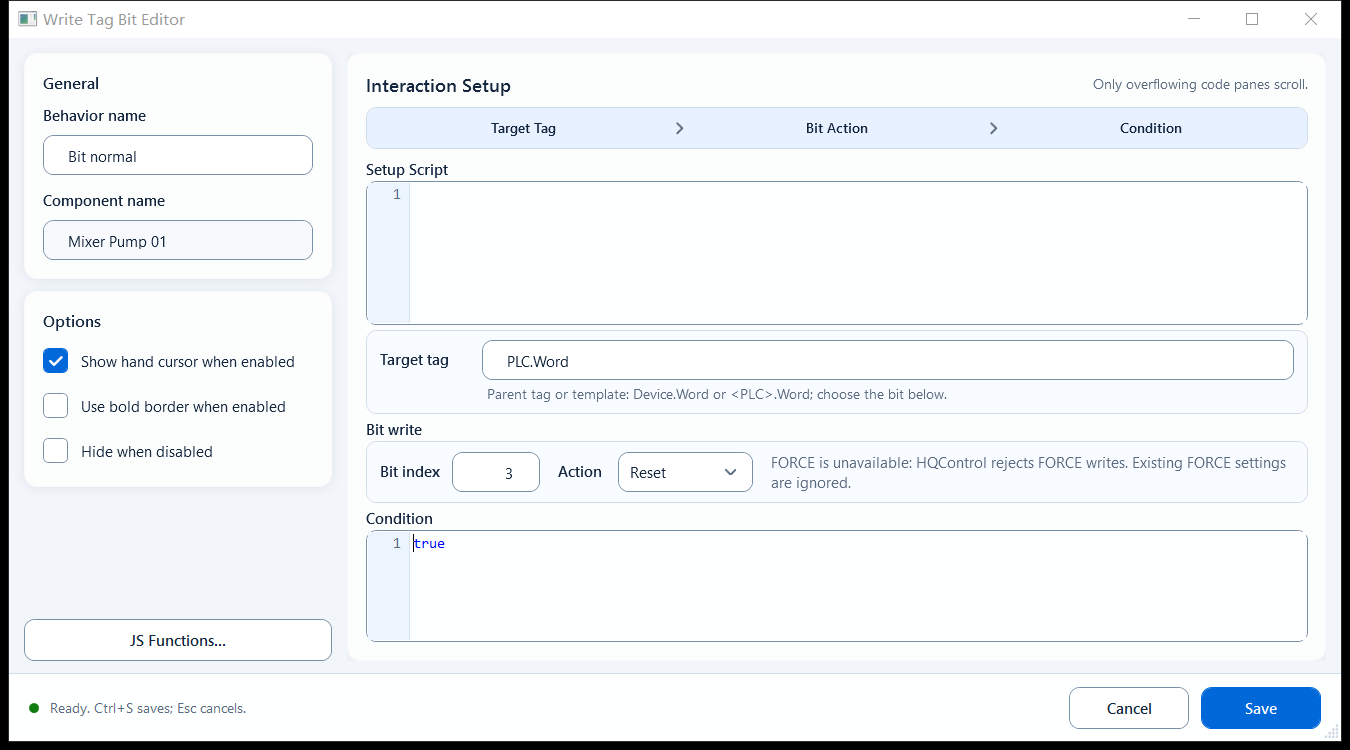
The editor has General, Interaction Setup and Options sections:
Behavior Name: a label for this behavior so you can recognize it later.
Component Name: the current shape name; read-only, cannot be edited.
Setup Script: optional. Prepare variables or helper logic here, or leave it empty.
Target Tag: enter the parent integer tag that holds the bits; do not add a bit subscript here. A plain tag name needs no quotes; use expression form for a variable.
Bit Index: which bit to change, 0-31. Bit 0 is the least significant (right-most) bit.
Bit Action: Set (force to 1) / Reset (force to 0) / Toggle (flip 0 and 1); pick one.
FORCE writes are unavailable. When opening an older project, review the write settings and save the behavior again.
Condition (Enabled): acts as a gate; runs the action when it evaluates to true, skips this click when false.
Options: Show hand cursor when enabled, Use bold border when enabled, Hide when disabled.
Typical case: one control-word integer packs several command bits.
Start/Stop button: use Toggle to flip the run bit in the control word, so one button starts and stops it.
Reset an alarm-acknowledge bit: use Reset to clear a bit, or use Set to raise an enable bit to 1.
When you need to gate the click, put a check in Condition (e.g. only allow the flip in remote mode).
Limitations and troubleshooting
Check these settings:
Tag must be the parent integer tag that holds the bits; do not append [bit] to the tag name. The bit is set separately by Bit Index (the [0..31] subscript form is for reads, not bit writes).
Bits are zero-based. Choose a bit supported by the parent Tag: 0–7 for 8-bit, 0–15 for 16-bit, or 0–31 for 32-bit values. The editor range does not validate the device width. This write path rejects 64-bit integer parents.
A write is not guaranteed to be immediate: the host may add permission checks, confirmation, reason input, or async processing, so never assume 'clicked means succeeded and synchronous'.
An empty Condition is treated as true (the action runs).
Figure 1: Write Tag Bit editor
Select the parent integer Tag, Bit Index and Set / Reset / Toggle action, then verify the write result in Mingcedar.