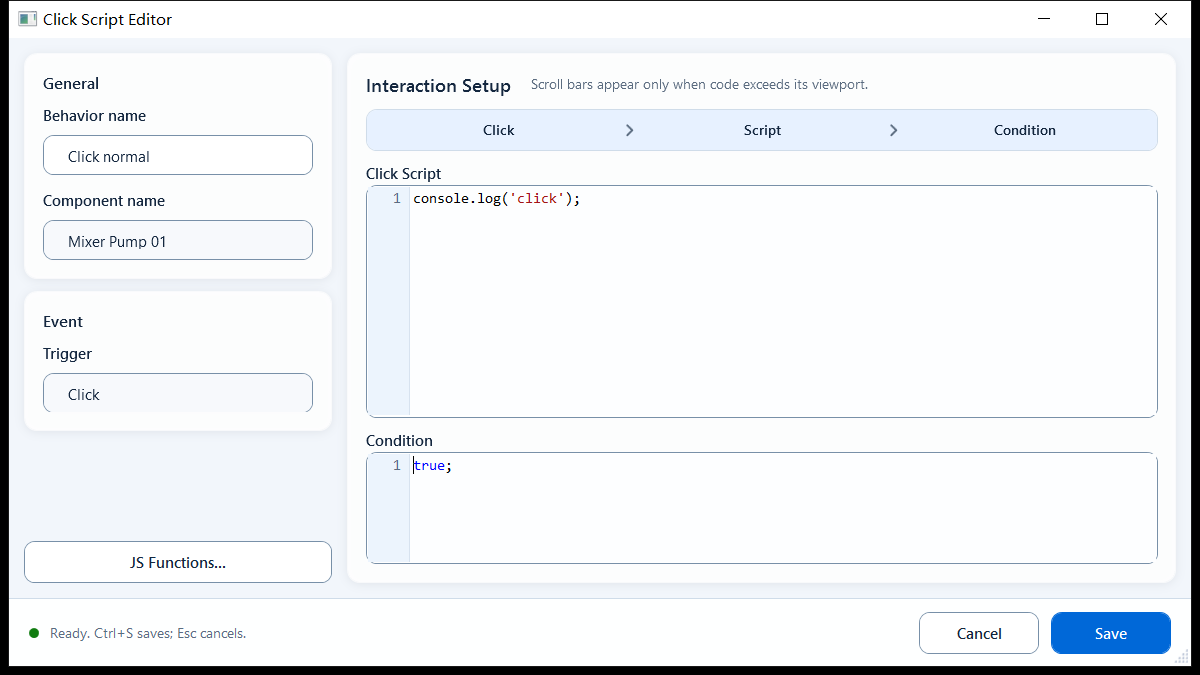
Run JavaScript on click for confirmation, Tag reads/writes, styling or navigation. Condition controls whether it runs.
InteractionsDocumentation revised: 2026-10-21
Interactions: Click Script
Run JavaScript on click for confirmation, Tag reads/writes, styling or navigation. Condition controls whether it runs.
What it is and what it's for
Click Script is an Interactions behavior for custom click logic. Scripts can access object, objects, event, tag, page, presentation, shape, hqVisuDesigner and globals.
Field configuration
General has editable Behavior Name and read-only Component Name; Trigger is Click. Configure these Interaction Setup fields:
Click Script: the script body executed on click. It supports multiple lines for conditions, tag reads and writes, component updates, and dialogs. Use return to exit early or return a result.
Condition: an enable-gate expression, defaulting to true;. Put only a single expression that resolves immediately to true/false here, e.g. ReadTagBoolean(...) or a comparison; when false, that click does not run.
Tag helpers available: ReadTagBoolean/Integer/Double/String, and during this real click action WriteTagBoolean/Integer/Double/String. Components and navigation use hqVisuDesigner (setComponentFill / setComponentText / setComponentVisible / openPage / openScreen, etc.).
Async APIs (fetch, setTimeout, setInterval, ...) belong only in a script body like Click Script; never in Condition (a synchronous evaluation slot).
The script snippet button is context-aware: it offers full script snippets in Click Script and short expression snippets in Condition.
JavaScriptJavaScript
// Click Scriptvar v = prompt("Enter a value", "0");if (v === null || v === "") { return; }var n = parseInt(v, 10);if (isNaN(n)) { alert("Please enter an integer."); return; }WriteTagInteger("PLC_LINE01.PUMP01.SETPOINT", n);// ConditionReadTagBoolean("PLC_LINE01.PUMP01.ALLOW_OP", false)
When to use it
Use for multi-step or custom click actions:
Confirm-then-write: prompt/confirm the operator first, then WriteTagInteger/WriteTagBoolean.
Drive several components on one click: recolor, relabel, or show/hide multiple components in a single handler (hqVisuDesigner.setComponentFill / setComponentText / setComponentVisible).
A guarded action button: wire Condition to an allow/logged-in/manual-mode tag so the click simply does nothing when the precondition isn't met.
Limitations and troubleshooting
Configuration requirements:
Writes remain subject to host permissions, confirmation, reason capture, and asynchronous processing. Calling WriteTag does not confirm that the device accepted the value; verify the result in the runtime platform.
Condition must return its result synchronously. It does not support fetch() or other asynchronous calls that return a Promise.
A multi-line Click Script can finish naturally without a final return. Use return in branches that must exit early, such as when the user cancels.
Don't navigate with relative disk paths: use hqVisuDesigner.openPage("PageName") within the same package, hqVisuDesigner.openScreen("SCREEN_CODE") across packages, and a URL only for real external sites.
Figure 1: Click Script editor
Write the on-click script in the Click Script box and use Condition to gate whether the click runs.