
Skip to content

Write Tag

Click to submit a Tag value for start, stop, setpoint or reset requests. Verify the host write result after submission.

InteractionsDocumentation revised: 2026-10-21

Interactions: Write Tag

Click to submit a Tag value for start, stop, setpoint or reset requests. Verify the host write result after submission.

Overview

Write Tag submits a value to Mingcedar, which checks permissions, confirmation and write handling. Editor preview does not write devices. Use Write Tag Bit for one bit of an integer.

Field configuration

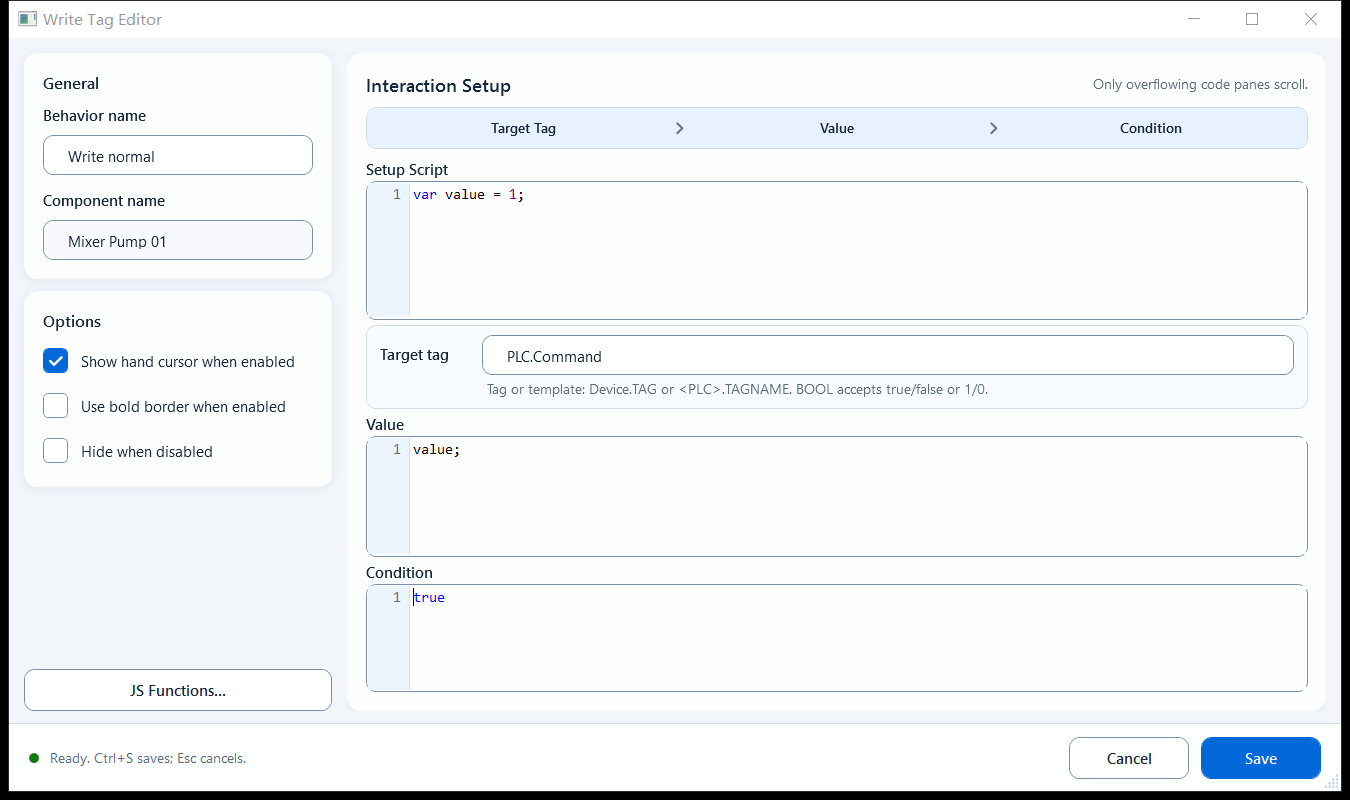
Bind Write Tag and set Target Tag and Value. Configure Setup Script, Condition and appearance options as needed.

  • Target Tag: the tag-name expression to write to. Enter the tag name directly, or use a template placeholder for reuse; the hint reads "Use Bit Index for bit writes."
  • Value: the value to write. Use a single expression or JavaScript that returns a value. The initial value is 1.
  • Setup Script: optional; prepare shared variables or helper logic for Value to use.
  • Condition: controls whether the behavior can run; it defaults to true. A false result prevents this behavior from running.
  • Options: Show hand cursor when enabled, Use bold border when enabled, Hide when disabled.
JavaScriptJavaScript
// Setup Script
var nextSetpoint = 1200;

// Target Tag
PLC_LINE01.PUMP01.SPEED_SETPOINT

// Value (submit the setpoint)
nextSetpoint

When to use it

Use for click-triggered start, stop, setpoint or reset requests. Collect operator values with Input and choose the submission behavior or Click Script.

Limitations and troubleshooting

Submission does not confirm success; check the host result.
  • Target Tag holds a tag-name expression, not necessarily a quoted string; just enter the tag name as the editor expects.
  • If Value is multi-line script, it must end with return, otherwise nothing is written.
  • The write may not take effect immediately: the host may run permission checks, a confirm dialog, an async write, or reject it; host write handlers may return a Promise.
  • Do not hand-assemble an integer here just to flip one bit. Use Write Tag Bit for that.
Write Tag behavior editor
Figure 1: Write Tag editor

Enter the target tag and the value to write; on click it writes to that tag, and the host decides whether the write succeeds.

Click the image again or press Esc to close