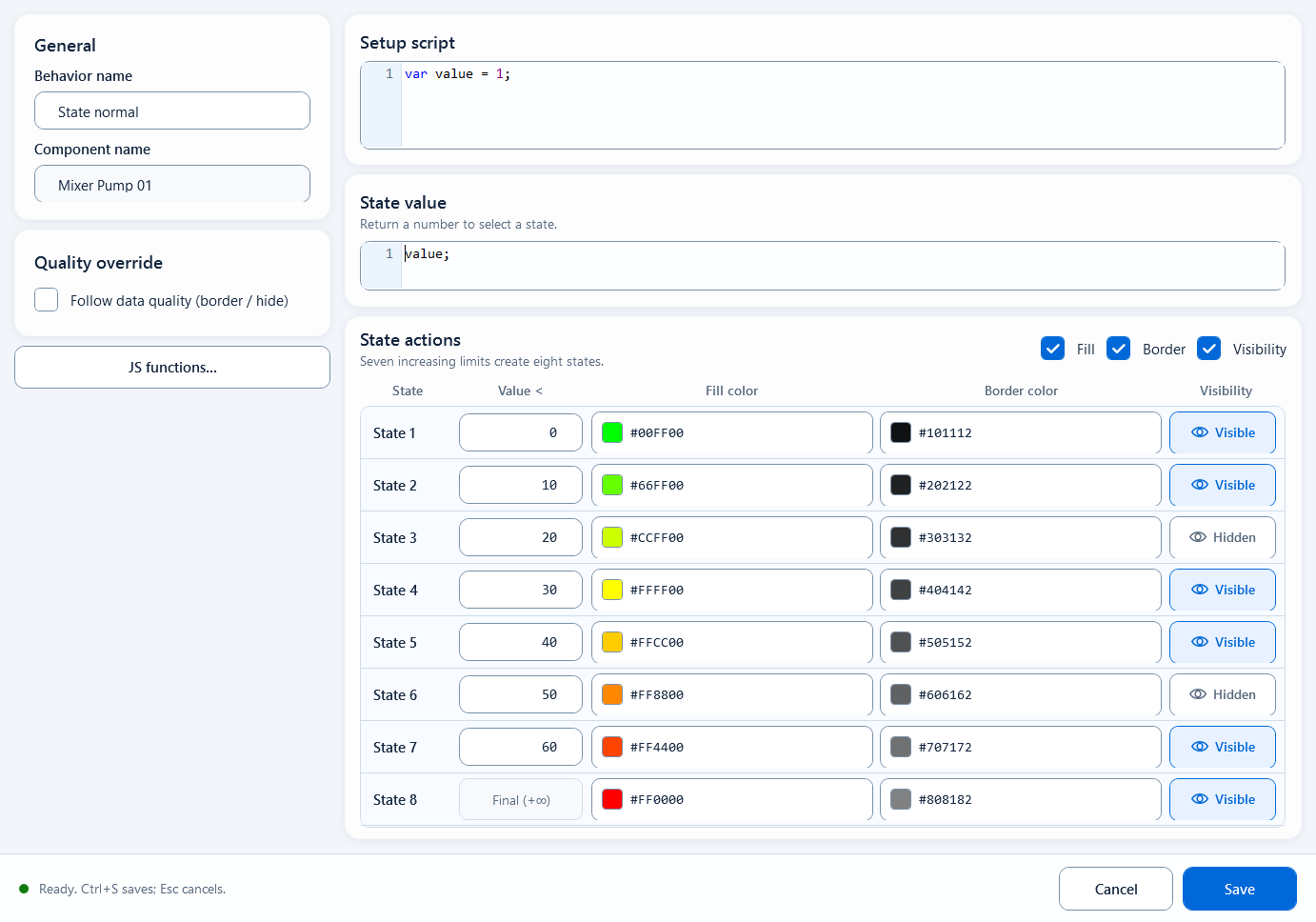
Divide a numeric value into up to eight threshold intervals, each with its own fill, border, and visibility settings. Use it for status codes or bit combinations with a limited set of values.
ColorsDocumentation revised: 2026-10-21
Colors: Discrete Color
Divide a numeric value into up to eight threshold intervals, each with its own fill, border, and visibility settings. Use it for status codes or bit combinations with a limited set of values.
Overview
Discrete Color uses seven increasing thresholds to divide State value into up to eight intervals. Each interval can set fill, border, and visibility. Use it for status codes, alarm levels, or bit combinations. To give specific values different appearances, set thresholds that separate those values.
Field configuration
Open the Discrete Color editor. Prepare data in Setup script and return a number from State value. In State actions, enter seven increasing thresholds in Value < to create eight state intervals.
Setup script (Setup Script): read a numeric Tag and prepare the state value.
State value: return a number such as stateValue. Use State Color for booleans, or convert explicitly to 0 / 1.
State actions / Value <: default thresholds are 0, 1, 2, 4, 8, 16, 32. Comparisons use strictly less than; the last state is Final (+∞).
Fill: a fill color per state (8 states); can be toggled on/off as a whole.
Border: a border color per state (8 states); can be toggled on/off as a whole.
Visibility: show or hide per state (8 states); can be toggled on/off as a whole.
Quality override: Follow data quality (border / hide) controls quality borders and hiding on bad quality. An enabled state border takes precedence over Good.
JavaScriptJavaScript
// Setup scriptvar stateValue = ReadTagInteger("PLC_LINE01.PUMP01.MODE", 0);// State valuestateValue
When to use it
Use it when a finite set of numeric values needs different appearances based on thresholds.
Device status codes: set thresholds so 0 (stopped), 1 (running), 2 (fault), and 4 (maintenance) fall into the intended color intervals.
Alarm level or bit combination: map an integer state into a few fixed buckets, each with its own fill/border/visibility.
Pitfalls
Check these limits:
State value must return a number; use State Color for a boolean condition.
8 states maximum. It can't express more than 8 states.
Discrete Color uses threshold intervals, not equality matching. With default thresholds, both 2 and 3 enter [2, 4). Adjust thresholds or use exact equality conditions in Multi-State Color when they must differ.
The seven Value < thresholds must increase. By default, 0 enters [0, 1) and values at or above 32 enter the final state. There is no automatic unknown-enum branch.
Quality Border reflects communication quality, not the process value itself; when quality is bad the shape should not keep rendering as if the value were valid.
Figure 1: Discrete Color editor
Snap one numeric value into up to 8 fixed states by limits, each with its own fill, border, and visibility.