Use a boolean condition to alternate between Blink ON and Blink OFF appearances for alarm or warning indication. Enable FALSE to apply the static Condition FALSE appearance when the condition is false.
ColorsDocumentation revised: 2026-10-21
Colors: Blink Color
Use a boolean condition to alternate between Blink ON and Blink OFF appearances for alarm or warning indication. Enable FALSE to apply the static Condition FALSE appearance when the condition is false.
Overview
Blink Color is a Visual States behavior for fill, border, and visibility. With TRUE enabled, a true condition alternates Blink ON and Blink OFF. With FALSE enabled, a false condition applies Condition FALSE. Blink Color has no blink-interval setting. Use State Color for ordinary running/stopped indication and Range Color for numeric bands.
Field configuration
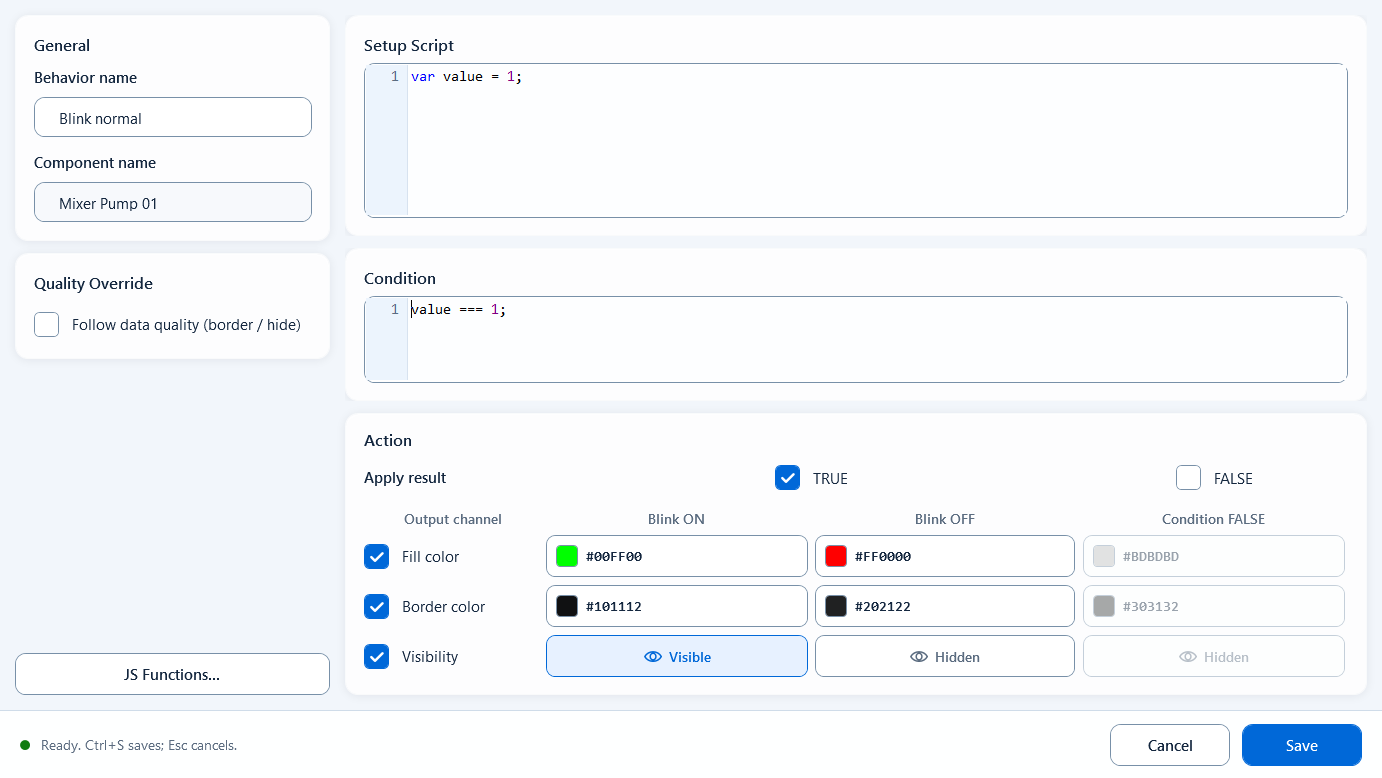
Bind Blink Color and configure the fields below. The example Condition blinks when the alarm bit is true.
Behavior Name: a recognizable name for this behavior (Component Name is read-only and filled in for you).
Setup Script: optional. Read tags, define variables, and compute intermediate values here for the Condition to use.
Condition: an expression returning true / false. Enter ReadTagBoolean("PLC_LINE01.PUMP01.ALARM", false) directly, or reference a boolean from Setup Script.
Action / Apply result: TRUE is enabled by default and FALSE is disabled. Enable FALSE and configure Condition FALSE for a static appearance after the alarm clears.
Output Channels: independently enable Fill Color, Border Color, and Visibility, in any combination.
Each enabled channel is configured across three columns: Blink ON, Blink OFF, and Condition FALSE - pick colors for fill/border, or visible/hidden for Visibility.
Quality Override: enable Follow data quality (border / hide) and configure Good and Bad. Enable Hide when quality is bad when the shape should be hidden on invalid data.
Use it for binary states that need a prominent warning.
Alarm lamp: blink the fill between red and dark red while the alarm bit is true; rest on a static gray after reset.
Run/warning block: blink the block while a device is faulted or needs action; keep a steady static color when normal.
Limitations and troubleshooting
Check these configuration boundaries:
Condition must return a boolean. Pass a literal Tag name to ReadTagBoolean; the name string itself is not an alarm state.
Blink Color has no Blink Interval or speed field.
Condition FALSE takes effect only with FALSE enabled. To show gray after an alarm clears, enable FALSE and Fill color and set the static color.
Quality Override represents data quality. On good quality, an explicit Border color takes precedence over Good. Bad quality restores the base appearance and applies the configured Bad border or visibility.
Figure 1: Blink Color editor
When the condition is true it toggles between Blink ON and Blink OFF; when false it rests on a static look, across fill, border, and visibility.