Select a TRUE or FALSE appearance from a boolean condition to control fill, border, and visibility. Enable the corresponding state in Apply result. Use it for running/stopped, open/closed, or auto/manual components.
ColorsDocumentation revised: 2026-10-21
Colors: State Color
Select a TRUE or FALSE appearance from a boolean condition to control fill, border, and visibility. Enable the corresponding state in Apply result. Use it for running/stopped, open/closed, or auto/manual components.
What it is and what it's for
State Color is in Visual States. Condition selects TRUE state or FALSE state, and only states enabled in Apply result apply their fill, border, and visibility. A false condition does not inherently stop display or hide the component. Use Range Color or Discrete Color for numeric bands, and Multi-State Color for prioritized conditions.
How to use it: fields in its editor
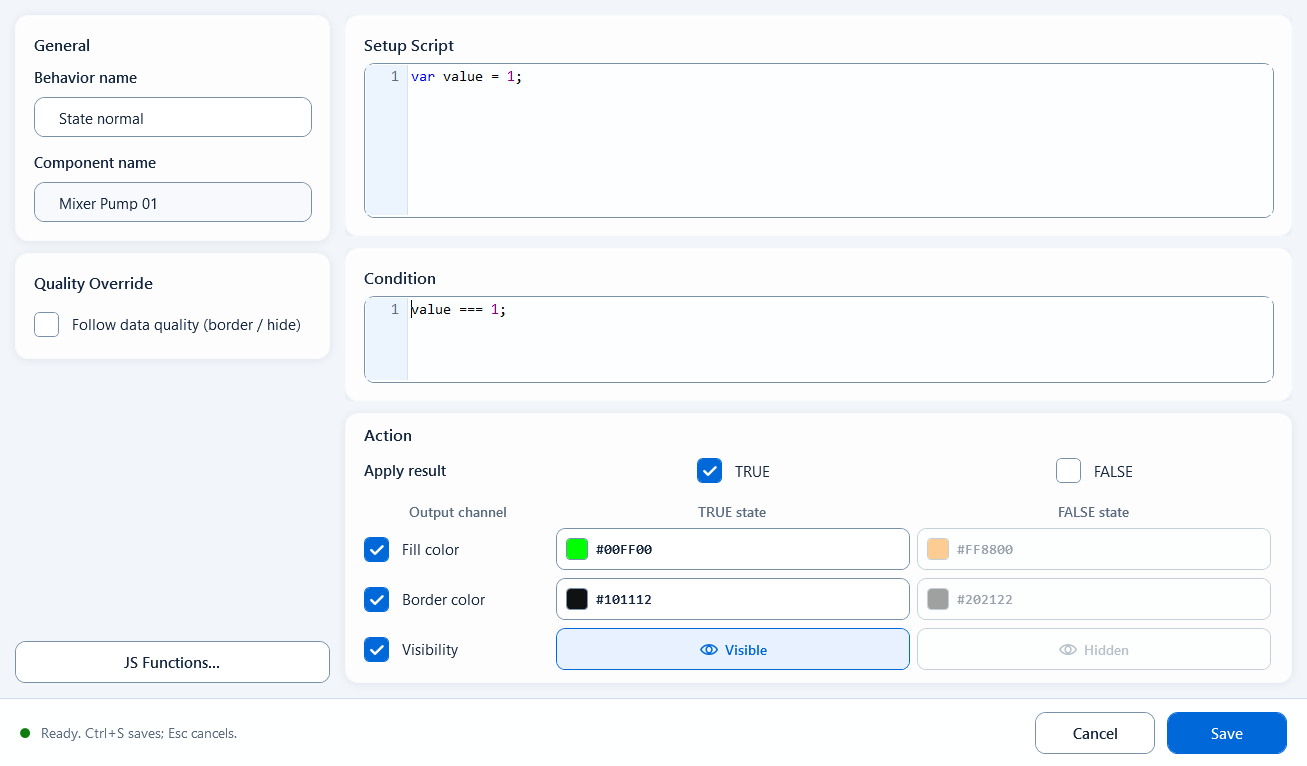
Bind State Color to the component and open its editor. Prepare data in Setup Script and return a boolean from Condition. In Action, enable the required states and output channels. Enter each part of the example in its indicated field.
Setup Script: optional variables and intermediate results for this behavior.
Condition: a boolean expression, such as ReadTagBoolean("PLC_LINE01.PUMP01.RUN", false), or running from Setup Script.
Apply result: TRUE is enabled by default. Enable FALSE to apply a static appearance when the condition is false.
Output channel: enable Fill color, Border color, or Visibility and configure TRUE state and FALSE state.
Quality Override: enable Follow data quality (border / hide), configure Good and Bad, and optionally enable Hide when quality is bad.
Save / Ctrl+S validates and saves. Cancel / Esc discards this edit.
Use it to distinguish two states by color or visibility.
Pump/motor run lamp: running = green, stopped = grey/orange
Valve open/close state: open = green, closed = red
Auto/manual or local/remote two-state markers
A boolean alarm block: shown and red when active, hidden when normal
Limitations and troubleshooting
FALSE is disabled by default; setting a FALSE state color alone does not apply it. Condition requires a boolean, not a literal Tag name or color string. State Color supports Quality Override: bad data quality restores the base appearance and applies the configured Bad border or visibility. On good quality, an enabled state border takes precedence over the Good border color. Configure data quality separately from running, stopped, and alarm states.
Figure 1: State Color editor
Write the condition in the editor and configure two style sets - fill, stroke, and visibility for the true and false states.