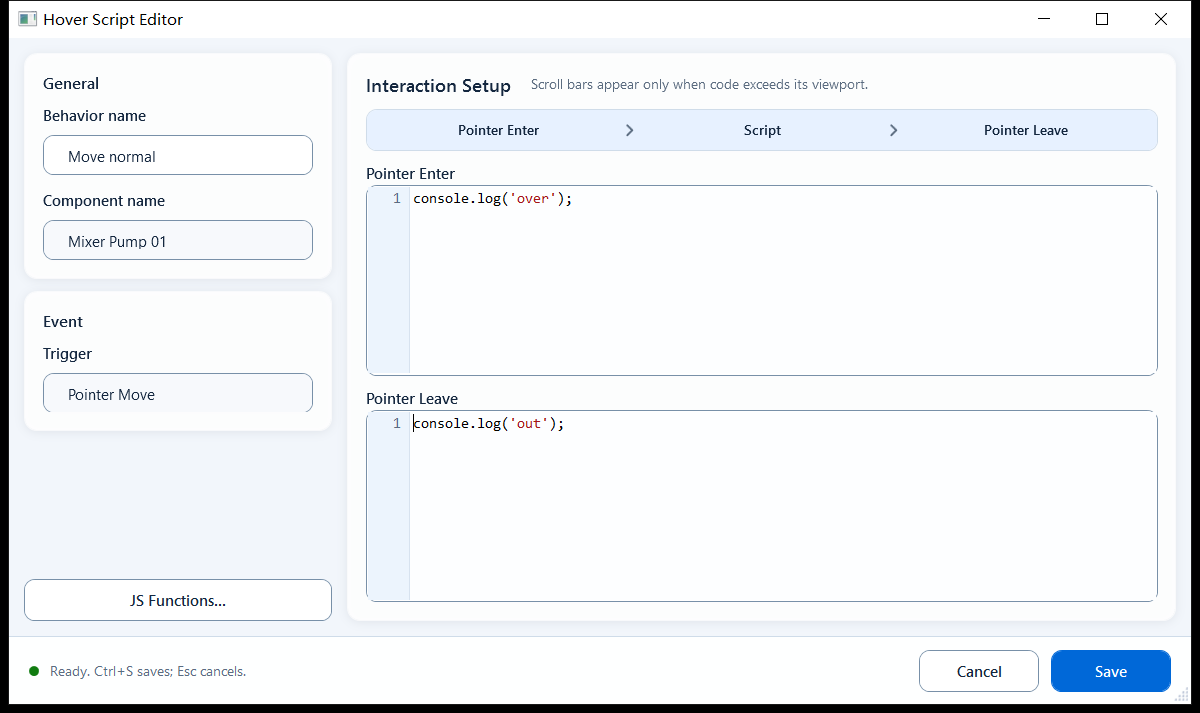
Bind JavaScript that runs on mouse over and mouse out of a shape: Pointer Enter for highlight/hint effects, Pointer Leave to restore. Runs only on real pointer interaction in the exported page.
InteractionsDocumentation revised: 2026-10-21
Interactions: Hover Script
Bind JavaScript that runs on mouse over and mouse out of a shape: Pointer Enter for highlight/hint effects, Pointer Leave to restore. Runs only on real pointer interaction in the exported page.
Overview
Hover Script attaches pointer-enter and pointer-leave scripts to a component for highlighting or temporary hints. It runs when a user moves the pointer in the Mingcedar runtime. Restore any appearance changed on enter in the leave script.
How to use it: the fields in its editor
Trigger is Pointer Move. Both script boxes support multi-line code, ReadTag* and async calls such as setTimeout and fetch. Hover actions must not write devices:
Pointer Enter (mouse over; called Mouse Over in the docs): script that runs when the pointer enters the shape.
Pointer Leave (mouse out; called Mouse Out in the docs): script that runs when the pointer leaves, used to undo what the enter script changed.
Context objects available in the script: object, objects, event (mouse context) plus tag, page, presentation, shape, hqVisuDesigner, and globals.
object is the current shape's DOM element, so you can set its style directly (e.g. object.style.opacity); shape.name is the shape name.
Note: Hover Script has no Enable/Condition gate (unlike Click Script); both scripts simply run.
Device-icon hover highlight: dim the opacity or add a stroke when the pointer is over a pump/valve, restore on leave, to signal it is clickable.
Temporary info hint: on enter use hqVisuDesigner to show a note or emphasis border on the page, clear it on leave, without interrupting the operator.
Limitations and troubleshooting
Check runtime and restoration behavior:
Enter changes are not auto-undone: you must write the matching restore logic in Pointer Leave, or the effect stays after the pointer leaves.
It runs only on real pointer interaction in the exported/host page, not in PowerPoint edit mode, so verify after export.
Do not call WriteTag* from Hover Script. The runtime grants write capability only to trusted click or Pointer Button press/release actions; keep hover purely visual.
Figure 1: Hover Script editor
Fill the Pointer Enter and Pointer Leave scripts separately; the leave script restores what the enter script changed.