
Run the actual screens
HQControl receives exported screen files, publishes them into the runtime directory, configures menu entry points, opens popup templates, and loads these pages in the runtime platform.
HQControl receives exported screen files, publishes them into the runtime directory, configures menu entry points, opens popup templates, and loads these pages in the runtime platform.
HQControl receives exported screen files, publishes them into the runtime directory, configures menu entry points, opens popup templates, and loads these pages in the runtime platform.
Devices define PLCs or data sources. Tags define names, addresses, data types, scan rates, and grouping fields. Siemens S7 supports absolute addresses through S7 TCP and symbolic addresses through OPC UA. Tag Diagnostics confirms live values and quality before screens, alarms, trends, or APIs rely on them.
HQControl records alarms, recoveries, events, and historical trend points. Large histories are viewed by time range, filters, lazy loading, and drill-down instead of loading everything at once.
Administrators, engineers, operators, and guests can have different capabilities. Writes, control actions, configuration pages, and licensing are separated, while event records help trace changes.
IO State API reads live values and WebSocket subscribes to changes. Integration Script uses the Tag Bridge, schedule / signed HTTP inbound / IO change triggers, and managed HTTP / PostgreSQL connectors for site integration.
The same runtime model works on Windows, Linux, and cloud servers. Federation organizes sites; redundancy decides which node actively polls and writes each device.
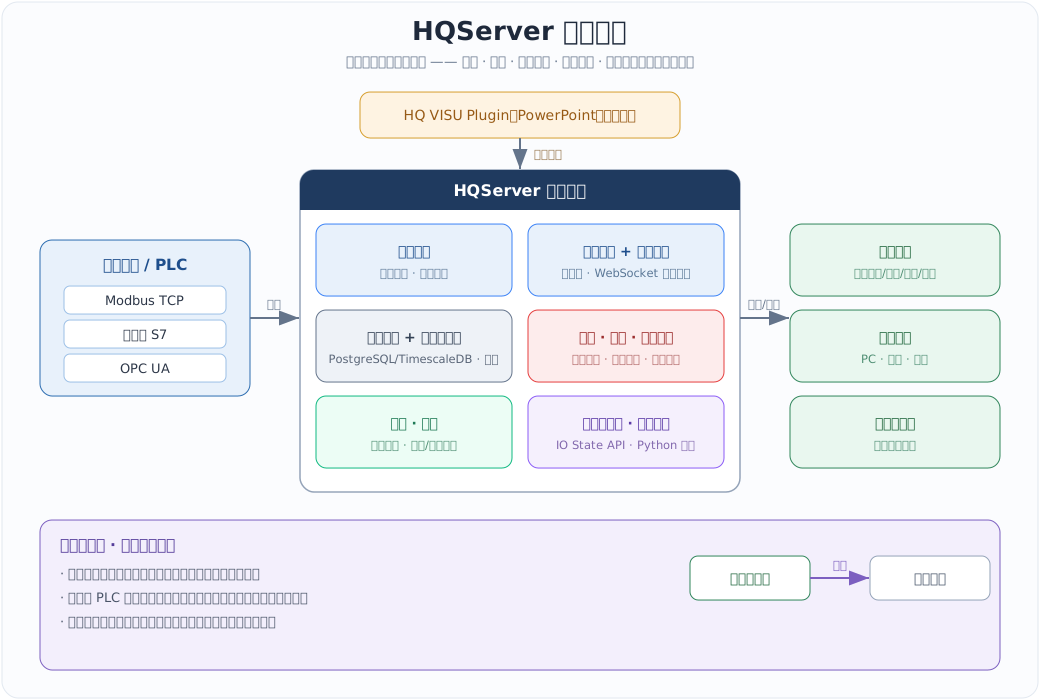
From field devices to runtime screens: collection, storage, alarms and trends, access and licensing, and third-party APIs all live inside HQControl, with multi-site federation and hot standby keeping it running.