
Manual
Custom-page SDK for project pages
The SDK gives project HTML controlled access to HQControl runtime capabilities. It provides realtime Tag snapshots and subscriptions, typed reads and writes, history, alarms, current user, permissions, language, navigation, device popups, and lightweight table helpers. It does not prescribe the page shape.
SDK: Custom-page SDK for project pages
The custom-page SDK is for project HTML pages deployed in HQControl runtime. A page runs in a sandbox iframe and obtains the SDK 1.5.0 Page API through `HQVISU_CUSTOM_PAGE.ready()`. Within its page capability it can read, subscribe to, and perform controlled Tag writes, and query history, alarms, session, permissions, and language data. Projects can build shift reports, energy summaries, diagnostics, and customer dashboards while HQControl enforces data and industrial-operation boundaries.1. What the SDK owns
The SDK gives project HTML controlled access to HQControl runtime capabilities. It provides realtime Tag snapshots and subscriptions, typed reads and writes, history, alarms, current user, permissions, language, navigation, device popups, and lightweight table helpers. It does not prescribe the page shape.
- Good fits: shift production reports, daily energy reports, equipment health pages, quality trace pages, work-order boards, and customer views.
- Page format: ordinary HTML with project CSS, JavaScript, chart libraries, and component logic.
- Data sources: declared tags, history data, alarm data, and language resources.
- Responsibility boundary: HQControl provides data and permission boundaries; the project page owns presentation and business calculations.
- SDK version: this manual describes SDK 1.5.0 in
hq-custom-page.js.
2. Runtime model and safety boundary
HQControl loads a custom page in a sandbox iframe. The page does not inherit private main-app objects or bypass login, permission, Tag scope, or server validation. Load hq-common.js before hq-custom-page.js, then use HQVISU_CUSTOM_PAGE.ready() to wait for the Host Bridge and obtain the Page API.
- Static declarations and dynamic exact-on-use declarations form the page capability; the Host still validates every final full Tag and does not grant prefix search or catalog enumeration.
- Realtime read, history, and alarm scopes are separate. Dynamic live read does not expand history or alarms.
- Writing requires page scope, Host capability, current-user
tag:writepermission, and a controllable Tag. - Navigation, popup, alarm, and write capabilities are declared by the current host. Check them with
api.supports()instead of assuming every host provides them. - Opening the HTML file directly has no real Host Bridge. Use the versioned Mock Host for local browser development.
What page-owned JavaScript can do
The SDK governs HQControl Host capabilities; it is not an allowlist for normal JavaScript. A custom page may use DOM, CSS, components, and chart libraries, plus standard browser interactions allowed by the browser and iframe sandbox.
- Supported: DOM/component logic and
alert,confirm, andprompt. - Supported:
window.open, form submission, browser navigation, and user-initiated downloads; browser popup and user-activation rules still apply. - Clipboard API is supported only when secure-context, user activation, browser permission, and enterprise-policy requirements are met.
- Service Worker registration is unsupported. The page does not receive Portal cookies, login tokens, Admin DOM, configuration APIs, or raw Host service objects.
- The page cannot poll a PLC directly and has no unpublished alarm acknowledge or shelving write API.
api.supports()checks Host Bridge capabilities, not browser API availability or permission.
3. Minimal integration steps
Declare scope first, include the SDK, then access data only after ready() resolves. Do not read HQVISU_HOST before ready(); the host bridge may not be injected yet.
- Place a
type="application/json"block withid="hqvisu-custom-page"in the HTML. - Declare
readableTagsand the requiredwritableTags; include only tags the page really needs. - Load
/runtime/hqVisuDesigner/hq-common.js, then/runtime/hqVisuDesigner/hq-custom-page.js. - Call
HQVISU_CUSTOM_PAGE.ready(), then use SDK APIs in the callback or afterawait. - Build realtime value and quality display first, then add history, alarms, writes, and tables.
- Validate inside HQControl runtime; opening the local HTML file directly is not a delivery check.
<!doctype html>
<html>
<head><meta charset="utf-8"><title>Line Report</title></head>
<body>
  <section id="app">Connecting to HQControl...</section>

  <script type="application/json" id="hqvisu-custom-page">
  {
    "readableTags": ["<device-code>.<temperature-tag-code>", "<device-code>.<run-state-tag-code>"],
    "writableTags": ["<device-code>.<setpoint-tag-code>"]
  }
  </script>
  <script src="/runtime/hqVisuDesigner/hq-common.js"></script>
  <script src="/runtime/hqVisuDesigner/hq-custom-page.js"></script>
  <script>
  HQVISU_CUSTOM_PAGE.ready().then((api) => {
    if (!api.supports("tag.read")) {
      document.getElementById("app").textContent = "This host does not provide live Tag reading";
      return;
    }
    document.getElementById("app").textContent =
      "Current temperature: " + api.readNumber("<device-code>.<temperature-tag-code>", 0).toFixed(1) + " C";
  }).catch((err) => {
    document.getElementById("app").textContent = "SDK initialization failed: " + err.message;
  });
  </script>
</body>
</html>
4. How to declare tag scope
The server statically parses supported JSON and page-data declarations and mints the page capability from them. A Tag must use a full dotted code such as <device-code>.<temperature-tag-code>. Bit references are limited to canonical [0] through [31]. Invalid or over-limit declarations prevent the expected capability from being minted.
- Supported config block ids:
hqvisu-custom-page,hqvisu-custom-page-config,hqvisu-page-config, andhqvisu-dependencies. - Readable aliases:
readableTags,tags,tagNames,readTags, andwatchTags. - Writable aliases:
writableTagsandwriteTags; matching declarations underoutputsare also collected. - Under
dependencies, supported fields aretags,tagNames,readableTags,readTags,writableTags, andwriteTags. - Values may be arrays or strings separated by newline, comma, or semicolon.
- Live read/write may declare
<device-code>.<status-word-tag-code>[3]; history does not accept bit references, so query the parent Tag. - SDK 1.5.0 automatically tracks readable tags declared in the config block; use
ready({ tags: [...] })only for legacy-page compatibility or additional subscriptions. <device-code>and<tag-code>in this manual are placeholders. Replace them with actual project codes before publishing.
<script type="application/json" id="hqvisu-custom-page">
{
  "readableTags": [
    "<device-code>.<temperature-tag-code>",
    "<device-code>.<pressure-tag-code>",
    "<device-code>.<run-state-tag-code>",
    "<device-code>.<output-tag-code>",
    "<device-code>.<energy-tag-code>"
  ],
  "writableTags": ["<device-code>.<setpoint-tag-code>"]
}
</script>
Dynamic exact-on-use Tags from parameters, loops, and composition
Declare exact-on-use when a page derives the final full Tag from a device parameter, loop, function, or string composition. It permits individual exact Tag admission, not wildcard prefixes, catalog enumeration, or unlimited authority. The Host still validates every final Tag for format, existence, enabled state, page session, and read/write rules.
liveTagRead.maxActiveTagsmay be 1 through 8000; the example requests the page maximum.- The formal
liveTagWrite.maxActiveTagslimit is 2000. - Good fits: select a device from page parameters, loop over a known device list, build a full Tag in a function, or bind a component to a business object.
- Unsupported:
<device-code>.*search, Tag catalog reads, device enumeration, or bypassing per-Tag Host validation. - Dynamic declaration expands exact live read/write only. History, alarms, device popups, and prefetch retain their own scopes.
- Static Tags remain recommended for first-screen prefetch, initial subscription, diagnostics, and least-privilege release evidence.
<script type="application/json" id="hqvisu-custom-page">
{
  "readableTags": ["<device-code>.<run-state-tag-code>"],
  "dependencies": {
    "runtimeAccess": {
      "liveTagRead": { "mode": "exact-on-use", "maxActiveTags": 8000 },
      "liveTagWrite": { "mode": "exact-on-use", "maxActiveTags": 2000 }
    }
  }
}
</script>

const deviceCode = new URLSearchParams(location.search).get("device");
const temperatureTag = `${deviceCode}.<temperature-tag-code>`;
api.track(temperatureTag);
5. ready() and lifecycle
ready(options | callback) waits for the Host Bridge and creates the Page API. It returns Promise<PageApi>; callback style still returns the same Promise. Declared readable Tags and options.tags are merged, deduplicated, and tracked.
tags: additional first-batch tracked Tags; static declaration is normally sufficient.timeoutMs: ordinary Host wait, default 5000 ms;bridgeTimeoutMs: embedded-bridge handshake, about 750 ms by default.writeTimeoutMs/writeAckTimeoutMs: write Host acknowledgement, default 10000 ms.historyTimeoutMs: history request, default 15000 ms;alarmsTimeoutMs: alarm request, default 15000 ms;localeTimeoutMs: locale change request.transport: "postMessage"orpostMessageOnly: true: force the embedded bridge for compatibility or diagnostics; ordinary pages should not set it.destroy(): cancels SDK subscriptions when the page or component is destroyed.
const api = await HQVISU_CUSTOM_PAGE.ready({
  timeoutMs: 5000,
  historyTimeoutMs: 15000,
  alarmsTimeoutMs: 15000
});

window.addEventListener("beforeunload", () => api.destroy(), { once: true });
SDK global-object API
The formal global is HQVISU_CUSTOM_PAGE; HQVisuCustomPage is its compatibility alias. These members are available before ready() and, apart from table rendering, do not access industrial data.
version: string1.5.0.ready(options | callback): returnsPromise<PageApi>.normalizeTagName(value): stringifies, trims, and removes one matching outer quote pair; returns a string.tagList(value): accepts strings, nested arrays, or a scalar; splits newline/comma/semicolon text, normalizes, drops empty values and legacy placeholders shaped like<TagName>, and deduplicates; returnsstring[].renderTable(target, rows, options): renders a lightweight HTML table and returns{ rowCount, columnCount }.
const normalizedTag = HQVISU_CUSTOM_PAGE.normalizeTagName("  'packaging-line-01.temperature'  ");
const reportTags = HQVISU_CUSTOM_PAGE.tagList([
  "packaging-line-01.temperature, packaging-line-01.pressure",
  "packaging-line-01.temperature"
]);
PageApi root object and capability matrix
The object returned by ready() is the formal application entry point. api.host retains a low-level Host facade whose width can vary by transport. Business code should prefer the root methods and stable namespaces such as api.auth, api.permissions, api.history, and api.alarms.
- Properties:
version,bridgeVersion,schemaRevision, frozencapabilities, and low-levelhost. - Discovery:
getCapabilities()returns a mutable copy;supports(name)returns a boolean and false for an unknown capability. - Namespaces:
auth,permissions,language,history,alarms,navigation, anddialog. - Root methods:
track,subscribe, all read/write methods,queryHistory,translate/t,renderTable,bindJsonTable, anddestroy. - Capability names:
page.parameters,tag.read,tag.write,history.read,user.read,navigation,popup,alarm.read, andlog.write. supports()indicates transport exposure only; it is not user permission and does not enlarge page scope.
Current-user and permission API
The stable session result is { user, permissions }. For an authenticated user, user contains username, displayName, and permissions. An anonymous direct Screen Gateway returns user: null and an empty permission array. Tokens, cookies, roles, and page-capability secrets are never exposed.
api.auth.getSession(): session snapshot. Useawait api.auth.getSession()for both synchronous and asynchronous Hosts.api.auth.getCurrentUser(): user snapshot or null.api.auth.hasPermission(code)/api.permissions.has(code): returnsPromise<boolean>.api.auth.requirePermission(code)/api.permissions.require(code): resolves true when allowed and rejects when denied.api.host.authis low-level; some transports also exposegetUser,getUsername, andgetDisplayName. Business code should not depend on that optional width.
const api = await HQVISU_CUSTOM_PAGE.ready();
const session = await api.auth.getSession();
const canWrite = api.supports("tag.write")
  && await api.permissions.has("tag:write");

renderCurrentUser(session.user);
setWriteControlsEnabled(canWrite);
6. Read realtime values and quality
Read methods are synchronous and return the latest snapshot pushed to the page; they do not make a server request per call. A value is not invalidated automatically when quality is abnormal, so check quality separately. Pass fallbacks for first render, disconnection, or missing snapshots.
read(tag, fallback): raw snapshot value; aliases do not add network calls.readNumber/readTagNumberandreadDouble/readTagDouble: JavaScriptNumber()conversion, fallback unless the result is finite.readInteger/readTagInteger: number truncated toward zero, or fallback on conversion failure.readBoolean/readTagBoolean: boolean result from booleans, nonzero/zero numbers, or true/false, 1/0, yes/no, on/off strings.readString/readTagString: stringifies non-null values; otherwise fallback.readJson/readTagJson: returns object values as supplied, parses strings, and returns fallback for empty or invalid JSON.readDateTime/readTagDateTime: returns a validDateobject, not an ISO string; otherwise fallback.readTagQuality(tag, fallback):good,bad,stale,pending, orunavailable; missing quality defaults topending.readTagQualityGood(tag): true only forgood.getMeta(tag)returns metadata such asquality,timestamp, andsource.
const temp = api.readNumber("<device-code>.<temperature-tag-code>", 0);
const running = api.readBoolean("<device-code>.<run-state-tag-code>", false);
const qualityGood = api.readTagQualityGood("<device-code>.<temperature-tag-code>");

renderKpi({
  title: "Current temperature",
  value: temp.toFixed(1),
  unit: "C",
  state: qualityGood ? "normal" : "bad-quality",
  subtitle: running ? "Line running" : "Line stopped"
});
7. Subscribe to realtime changes
track(tags) normalizes and starts tracking Tags and returns the deduplicated name array. subscribe(tags, callback) returns an idempotent unsubscribe function; its callback is (items, api). Do not assume the subscription callback owns first render: read the latest snapshot first, then subscribe to later changes.
- Each change has at least
tagName,fullCode, andvalue, plus available metadata such asquality,timestamp, andsource. - A page may hold at most 8000 active unique Tags. Invalid, missing, disabled, or rejected candidates do not permanently consume the budget.
- The wire boundary carries at most 256 Tags per batch and the SDK runs up to four batches concurrently; a large page still uses one logical realtime subscription and one WebSocket.
- Use the callback's second argument to read a consistent current snapshot; group high-frequency Tags and update UI in one pass.
- Unsubscribe when scope changes or the component exits.
destroy()cleans up remaining Tag and alarm subscriptions.
const stopRealtime = api.subscribe([
  "<device-code>.<temperature-tag-code>",
  "<device-code>.<run-state-tag-code>",
  "<device-code>.<output-tag-code>"
], (items, host) => {
  updateRealtimeCards({
    temperature: host.readNumber("<device-code>.<temperature-tag-code>", 0),
    running: host.readBoolean("<device-code>.<run-state-tag-code>", false),
    output: host.readNumber("<device-code>.<output-tag-code>", 0)
  });
});

// stopRealtime();
8. Write tags
Every write method returns a Promise. An industrial write must pass four gates: page write scope, Host tag.write capability, current-user tag:write permission, and a controllable Tag. The Host also requires a trusted user action; automatic writes during load, a timer, or a call without user activation are blocked. One page may have only one write awaiting confirmation or completion.
writeTag/write(tag, value, options): raw write;options.valueTypeoroptions.typemay specify the type.writeTagBoolean: JavaScript truthiness conversion, so string"false"is true and form values must be parsed explicitly;writeTagInteger: number truncated toward zero;writeTagDouble: Number conversion.writeTagString: null becomes an empty string;writeTagJson: submits a JSON value;writeTagDateTime: a Date becomes an ISO string.options.reasonis the audit reason and is mandatory when the Tag requires one. Confirm setpoints, reset, and control actions with the operator.- Common failures: Tag outside scope or missing, permission denied, control disabled, invalid/oversized value, missing reason, busy/rate-limited write, page change, unavailable Host, or timeout.
async function increaseSetpoint() {
  if (!api.supports("tag.write") || !await api.permissions.has("tag:write")) {
    showToast("This page or user cannot write Tags", "error");
    return;
  }
  const current = api.readNumber("<device-code>.<setpoint-tag-code>", 0);
  const next = current + 1;
  if (!confirm(`Write setpoint ${next.toFixed(1)}?`)) return;

  try {
    const result = await api.writeTagDouble("<device-code>.<setpoint-tag-code>", next, {
      reason: "Operator adjusted the shift setpoint"
    });
    handleWriteResult(result);
  } catch (error) {
    showToast("Write failed: " + error.message, "error");
  }
}
Write result: evaluate accepted and status together
A resolved Promise means the Host returned a write result; it does not prove that the device reached the target. The core result is { accepted, commandId, journalId, status, automaticRetryAllowed, currentValue }. currentValue is a complete TagValue snapshot suitable for refreshing the UI.
done/proxied: completed request; still display the returned snapshot or later realtime value as final state.readback_failed/readback_mismatch: the action may have executed but readback failed or differed; tell the operator to verify the process.latest_superseded: a newer value superseded this result; display the latest snapshot instead of the old target.pending_verification/outcome_uncertain: the outcome cannot be confirmed safely. Never retry automatically; showcommandIdand require PLC/Tag verification.failed,cancelled,page_changed, oraccepted: false: no normal completion. Report the state and do not claim success.- When
automaticRetryAllowedis false or absent, do not replay. Industrial pages must not retry immediately in catch handlers.
function handleWriteResult(result) {
  const status = String(result?.status || "");
  if (status === "outcome_uncertain" || status === "pending_verification") {
    showBlockingNotice("Verify the PLC/Tag state; do not retry", result?.commandId);
    return;
  }
  if (result?.accepted !== true) {
    showToast("Write not accepted: " + (status || "unknown"), "error");
    return;
  }
  if (["readback_failed", "readback_mismatch", "latest_superseded"].includes(status)) {
    showToast("Write requires verification: " + status, "warning");
    renderTagSnapshot(result.currentValue);
    return;
  }
  showToast("Write completed: " + status, "success");
  renderTagSnapshot(result.currentValue);
}
9. Query history and trends
api.history.query(request) and root alias api.queryHistory(request) both return Promise<HistoryQueryResult>. The request reads the history store and does not poll a PLC. Every Tag must be inside the page history-read scope.
- Request fields:
tags,start,end,interval, andaggregate, with optionalpoints. tagsis required and supports at most 16 deduplicated Tags. History does not accept[0]through[31]bit references; query the parent Tag.startandendmust be RFC 3339 timestamps, with a maximum range of 366 days.intervalsupportsm,h,d, andw, for example15m,1h,1d, or1w; minimum 1 minute.aggregatesupportsavg,min,max,sum,count,first,last,delta, andraw.deltafits meters and accumulating counters such as energy, water, or production total.- Omitted or zero
pointsdefaults to 20000. Maximum is 20000 and it cannot be smaller than the deduplicated Tag count.
const weekEnergy = await api.history.query({
  tags: [
    "<primary-device-code>.<energy-tag-code>",
    "<secondary-device-code>.<energy-tag-code>"
  ],
  start: "2026-07-01T00:00:00+08:00",
  end: "2026-07-08T00:00:00+08:00",
  interval: "1d",
  aggregate: "delta",
  points: 20000
});

renderEnergyReport(weekEnergy.items, {
  interval: weekEnergy.effectiveInterval,
  truncated: weekEnergy.truncated
});
How to consume a history result
The result is { items, effectiveInterval, rangeStart, rangeEnd, truncated }. items contains one series per requested Tag. A series is { tag, tagId, displayName, points }; every point is { t, value, quality }.
tagis the full Tag code,tagIdis the server identifier, anddisplayNamemay be empty.points[].tis RFC 3339,valueis raw or aggregated, andqualityis that point's quality.effectiveIntervalis the interval actually used and may be coarser than requested when the point budget is tight.rangeStartandrangeEndare the actual UTC/RFC 3339 range.truncated: truemeans the server coarsened the interval to fit the budget; show the actual interval to the user.- An empty
pointsarray is no data, not zero. Render an empty state.
for (const series of weekEnergy.items || []) {
  const chartPoints = (series.points || []).map((point) => ({
    time: new Date(point.t),
    value: point.value,
    quality: point.quality
  }));
  drawEnergySeries(series.displayName || series.tag, chartPoints);
}
showActualInterval(weekEnergy.effectiveInterval, weekEnergy.truncated === true);
Alarm-scope declaration
The server mints alarm scope from page declarations; client query fields cannot enlarge it. Declare dimensions under alarm, alarmScope, or pageAlarm in the JSON configuration. Readable Tags are also added automatically to the alarm Tag scope.
- Supported dimensions:
tags,plcCodes,functionGroupCodes,deviceGroupCodes, andsignalGroupCodes. - With no alarm scope, active and historical alarm queries return an empty scope.
- Dynamic
liveTagReaddoes not enlarge alarms. Statically declare required alarm Tags or groups. - The server overwrites any client scope fields with the minted capability; additive JSON cannot reveal more alarms.
<script type="application/json" id="hqvisu-custom-page">
{
  "readableTags": ["<device-code>.<temperature-tag-code>"],
  "alarmScope": {
    "plcCodes": ["<device-code>"],
    "functionGroupCodes": ["<function-group-code>"],
    "deviceGroupCodes": [],
    "signalGroupCodes": []
  }
}
</script>
10. Query and subscribe to alarms
The alarm namespace provides a synchronous Host snapshot, asynchronous active alarms, asynchronous historical queries, and change subscription. getActive() and getActiveAlarms() both return Promise<AlarmQueryResult>; queryHistory(request) returns the same paged shape.
getSnapshot()returns the current Host snapshot synchronously. A Host may return an array or a wrapper such as{ alarms }or{ activeAlarms }.- Query fields:
start,end,severity,state,source/q,limit,offset,cursorTs, andcursorId. - History defaults to the most recent 24 hours when times are omitted; one query spans at most 24 hours.
- Omitted or zero
limitis 500 and the maximum is 500; larger values are clamped.offsetmust be nonnegative. - Result:
{ items, count, hasMore, nextCursorTs, nextCursorId }. When more data exists, pass both next-cursor fields into the next request. subscribe(callback)returns an idempotent unsubscribe function and calls(items, api). A Host may send a complete snapshot or change items; use it as a refresh signal rather than blindly appending.
function alarmItemsFromSnapshot(snapshot) {
  if (Array.isArray(snapshot)) return snapshot;
  if (Array.isArray(snapshot?.alarms)) return snapshot.alarms;
  if (Array.isArray(snapshot?.activeAlarms)) return snapshot.activeAlarms;
  return [];
}

renderAlarmSummary(alarmItemsFromSnapshot(api.alarms.getSnapshot()));
const activeResult = await api.alarms.getActiveAlarms();
renderAlarmSummary(activeResult.items || []);

const historyResult = await api.alarms.queryHistory({
  start: "2026-07-07T00:00:00+08:00",
  end: "2026-07-08T00:00:00+08:00",
  severity: ["critical", "high"],
  state: ["active", "recovered"],
  limit: 200
});

const stopAlarms = api.alarms.subscribe(() => scheduleActiveAlarmRefresh());
Alarm item and paging fields
Each item can drive a list, card, or detail view. Treat fields as additive and do not infer state from translated display text.
- Identity:
id,deviceId,deviceCode,deviceName,tagId,tagCode,fullCode, anddisplayName. - Content:
messageText,alarmKind,severity,state,displayValue, andquality. - Times:
activeTs,recoverTs,closeTs,ackTs,shelvedUntil, andserverTs. - Flags:
suppressed; some items also carryackUserId,areaCode,objectIdentifier, andgroupCode. countis this page's item count andhasMoresignals another page. Cursor paging avoids offset duplicates or gaps while alarms change.- The SDK exposes alarm read and subscription only; custom pages cannot call unpublished acknowledge, shelve, or close APIs.
Navigation API
The formal methods are gotoPage, gotoAndon, gotoScreen, and openUrl. Check api.supports("navigation") first. Host-placed new windows, fullscreen boards, Screen navigation, and external URLs normally require a trusted user action. An embedded-bridge true result means dispatched, not that the destination finished loading.
navigation.gotoPage(pageName, options): navigate to a safe relative HTML page in the page package.navigation.gotoAndon(pageName, options): ask the Host to open an Andon/fullscreen page.navigation.gotoScreen(screenCode): navigate to an HQControl Screen.navigation.openUrl(url, options): Host mode accepts HTTP(S) URLs only.- Options:
openInNewWindow,frameTarget, andparameters: [{ key, value }]. - At most 64 parameters; key length 256 and value length 2048. Invalid entries are ignored or truncated.
document.getElementById("open-detail").addEventListener("click", () => {
  const dispatched = api.navigation.gotoPage("device-detail.html", {
    frameTarget: "_self",
    parameters: [
      { key: "device", value: "<device-code>" },
      { key: "source", value: "shift-report" }
    ]
  });
  if (!dispatched) showToast("The Host did not accept navigation", "error");
});
Device-popup API
api.dialog.openDevicePopup(payload) asks the Host to open the formal device popup; api.dialog.close() asks it to close the current Host dialog. Check api.supports("popup") and call from a real click. A true result means dispatched only.
plcordeviceCodeis required, and that PLC must have at least one Tag inside page read scope.- Optional
focusTagNamescontains at most 64 Tags, all inside page read scope. templateCode/idcan select a popup template.diagnosisControlandgroupRightIndexare optional popup context.- A device popup does not expand page read/write scope or expose popup service objects.
document.getElementById("open-device-popup").addEventListener("click", () => {
  const dispatched = api.dialog.openDevicePopup({
    deviceCode: "<device-code>",
    templateCode: "<popup-template-code>",
    focusTagNames: [
      "<device-code>.<temperature-tag-code>",
      "<device-code>.<run-state-tag-code>"
    ]
  });
  if (!dispatched) showToast("The Host did not accept the device popup", "error");
});
11. Complete case: shift operation and energy report
A complete business page defines Tags and shift calculations first, renders the initial snapshot, subscribes to realtime changes, and loads history and alarms as independently failing asynchronous regions. Return one cleanup function when the component exits so one query failure never turns the entire page blank.
- Realtime KPIs: use
readNumber/subscribefor current output, temperature, running state, and quality. - Trend charts: use
history.queryfor hourly, daily, or weekly data, then render with the page chart library. - Energy or production reports: use
aggregate: "delta"for accumulated meters; useavg/min/maxfor analog values. - Alarm summary: use
alarms.getSnapshot(),getActiveAlarms(), andqueryHistory()to summarize current risk and history. - Data tables: use
renderTablefor simple tables; use project components for complex tables. - Exception states: handle empty data, denied scope, bad/stale/pending quality, and query timeout.
async function startShiftReport(api, shiftStart, shiftEnd) {
  const tags = {
    output: "<device-code>.<output-tag-code>",
    energy: "<device-code>.<energy-tag-code>",
    running: "<device-code>.<run-state-tag-code>"
  };

  function renderLive() {
    drawKpiCards({
      output: api.readNumber(tags.output, 0),
      energy: api.readNumber(tags.energy, 0),
      running: api.readBoolean(tags.running, false),
      outputQuality: api.readTagQuality(tags.output, "pending")
    });
  }

  renderLive();
  const stopRealtime = api.subscribe(Object.values(tags), renderLive);

  try {
    const trend = await api.history.query({
      tags: [tags.energy],
      start: shiftStart,
      end: shiftEnd,
      interval: "1h",
      aggregate: "delta"
    });
    drawEnergyTrend(trend.items || [], trend.effectiveInterval);
  } catch (error) {
    renderTrendError(error.message);
  }

  try {
    const alarms = await api.alarms.getActiveAlarms();
    api.renderTable("#alarm-table", alarms.items || [], {
      columns: [
        { key: "severity", label: "Severity" },
        { key: "messageText", label: "Alarm" },
        { key: "activeTs", label: "Active time" }
      ]
    });
  } catch (error) {
    renderAlarmError(error.message);
  }

  return () => stopRealtime();
}
12. renderTable and bindJsonTable
api.renderTable and global HQVISU_CUSTOM_PAGE.renderTable are the same lightweight helper, not a report system. They render arrays, { rows }, or { items } and return { rowCount, columnCount }. bindJsonTable performs the first render, subscribes to a JSON Tag, and returns an unsubscribe function.
targetmay be a CSS selector or DOM element.options.columnscan be an array of strings or{ key, label }objects.- When columns are omitted, the SDK infers columns from the first 25 rows.
options.classNamesets the table class; the page owns the CSS.- Cells are written through
textContent, not executed as HTML. A missing target returns{ rowCount: 0, columnCount: 0 }. bindJsonTable(target, tagName, options)accepts array JSON,{ rows }, or{ items }; empty or invalid JSON renders an empty table.- Complex sorting, pagination, frozen columns, and Excel export should be implemented by the project page or a table component.
api.renderTable("#quality-table", {
  rows: [
    { tag: "<device-code>.<temperature-tag-code>", value: "72.4", quality: "good" },
    { tag: "<device-code>.<pressure-tag-code>", value: "0.68", quality: "good" }
  ]
}, {
  className: "report-table",
  columns: [
    { key: "tag", label: "Tag" },
    { key: "value", label: "Current value" },
    { key: "quality", label: "Quality" }
  ]
});

const stopTable = api.bindJsonTable("#event-table", "<device-code>.<event-rows-tag-code>", {
  columns: ["time", "type", "message"]
});
13. Language
A custom page can follow the current HQControl language. api.translate and api.t are root aliases for api.language.translate. Locale changes affect the entire runtime and are not component-local state.
language.current()/getLocale(): returns the current locale synchronously.language.translate(key, fallback)/t(key, fallback): returns a string synchronously; missing keys return fallback, or the key when fallback is omitted.language.onChange(callback)/subscribe(callback): calls(locale, translations)and returns an idempotent unsubscribe function.language.setLocale(locale): returnsPromise<string>with the actual locale and notifies subscribers.
function renderTitle() {
  document.getElementById("title").textContent =
    api.t("shiftReport.title", "Production Shift Report");
}

renderTitle();
const stopLanguage = api.language.onChange((locale, translations) => renderTitle());
Local development with the Mock Host
The versioned runtime-page-sdk-mock-host-v1.js provides development data without HQControl. Create the Mock Host before loading hq-common.js and hq-custom-page.js. It tests rendering, subscription, and error states; it is not a security, permission, audit, write-confirmation, history-store, or PLC simulator.
createHQVisuMockHost(options)returns a development Host.options.values,meta,user,alarms, andlocaleestablish initial state.queryHistoryandqueryAlarmHistorycan supply custom query results.host.__mock.setTag(name, value, meta)pushes a Tag change;setAlarms(items)pushes an alarm snapshot.- Delivery validation must return to HQControl Runtime and retest capability, ordinary-user permission, write confirmation, and real query limits.
<script src="./runtime-page-sdk-mock-host-v1.js"></script>
<script>
window.HQVISU_HOST = createHQVisuMockHost({
  values: { "packaging-line-01.temperature": 72.4 },
  meta: { "packaging-line-01.temperature": { quality: "good" } },
  user: {
    username: "shift-operator",
    displayName: "Shift Operator",
    permissions: []
  }
});
</script>
<script src="./hq-common.js"></script>
<script src="./hq-custom-page.js"></script>
PPT-page migration compatibility globals
After ready() completes, the SDK installs PPT runtime compatibility globals. They exist to migrate established pages and are not the preferred API for new custom pages. New code should use api.* for capability checks, tests, and lifecycle cleanup.
- Reads:
ReadTag,ReadTagBoolean,ReadTagInteger,ReadTagDouble,ReadTagString,ReadTagJson,ReadTagDateTime,ReadTagQuality, andReadTagQualityGood. - Read aliases:
GetTagValueAsBoolean,GetTagValueAsInteger,GetTagValueAsDouble,GetTagValueAsString,GetTagValueAsJson,GetTagValueAsDateTime,GetTagQuality, andIsTagQualityGood. - Writes:
WriteTag, sixWriteTag<Type>methods, and sixSetTagValueAs<Type>aliases. - User:
GetCurrentUser,GetCurrentUsername, andGetCurrentDisplayName. - Language:
HQVISU_LANGUAGE_PROVIDER,HQVISU_USE_LANGUAGE,HQVISU_TRANSLATE, andHQVISU_TRANSLATIONS.
14. Error handling and delivery checks
Synchronous reads use fallbacks. Writes, history, alarms, and locale changes return Promises and require try/catch or .catch(). Standard bridge codes are INVALID_ARGUMENT, CAPABILITY_DENIED, PERMISSION_DENIED, NOT_FOUND, TIMEOUT, UNAVAILABLE, and INTERNAL_ERROR; record both error.code and error.message.
- Open the page as administrator and as an ordinary user to verify the permission boundary.
- Remove or deny one undeclared tag deliberately and confirm the page shows a clear empty/error state instead of a blank page.
- Simulate bad or stale quality and confirm the page does not display it as a normal value.
- Verify history range, aggregate meaning, units, decimals, and chart explanations.
- Verify writes include confirmation, failure messages, and an audit reason.
- Verify
outcome_uncertain/pending_verificationenters a blocking state and never retries automatically. - Call Tag, alarm, language, and table-binding unsubscribe functions as components exit; call idempotent
api.destroy()on page exit. Do not reuse subscriptions or pending requests after disposal. - Open the browser console and confirm there are no SDK initialization failures, 404s, JSON parse errors, or unhandled Promises.
try {
  const history = await api.history.query({
    tags: ["<device-code>.<output-tag-code>"],
    start,
    end,
    interval: "1h",
    aggregate: "sum"
  });
  renderTrend(history.items || []);
} catch (err) {
  renderEmptyState("History query failed: " + err.message);
}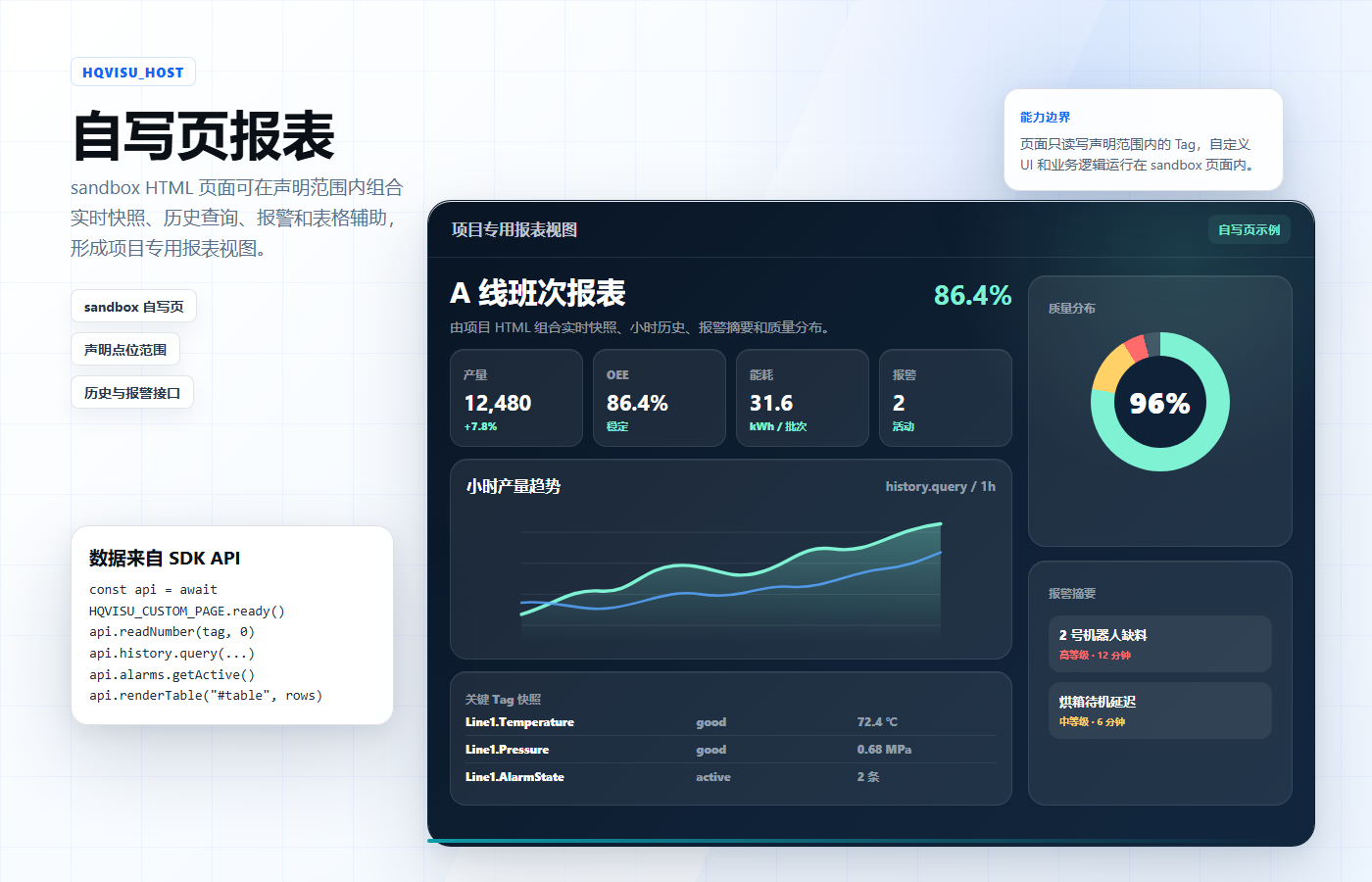
This illustrative image shows how custom HTML can organize realtime snapshots, history queries, alarm summaries, and table helpers into a project report page. Page styling and business calculations are implemented by project code.