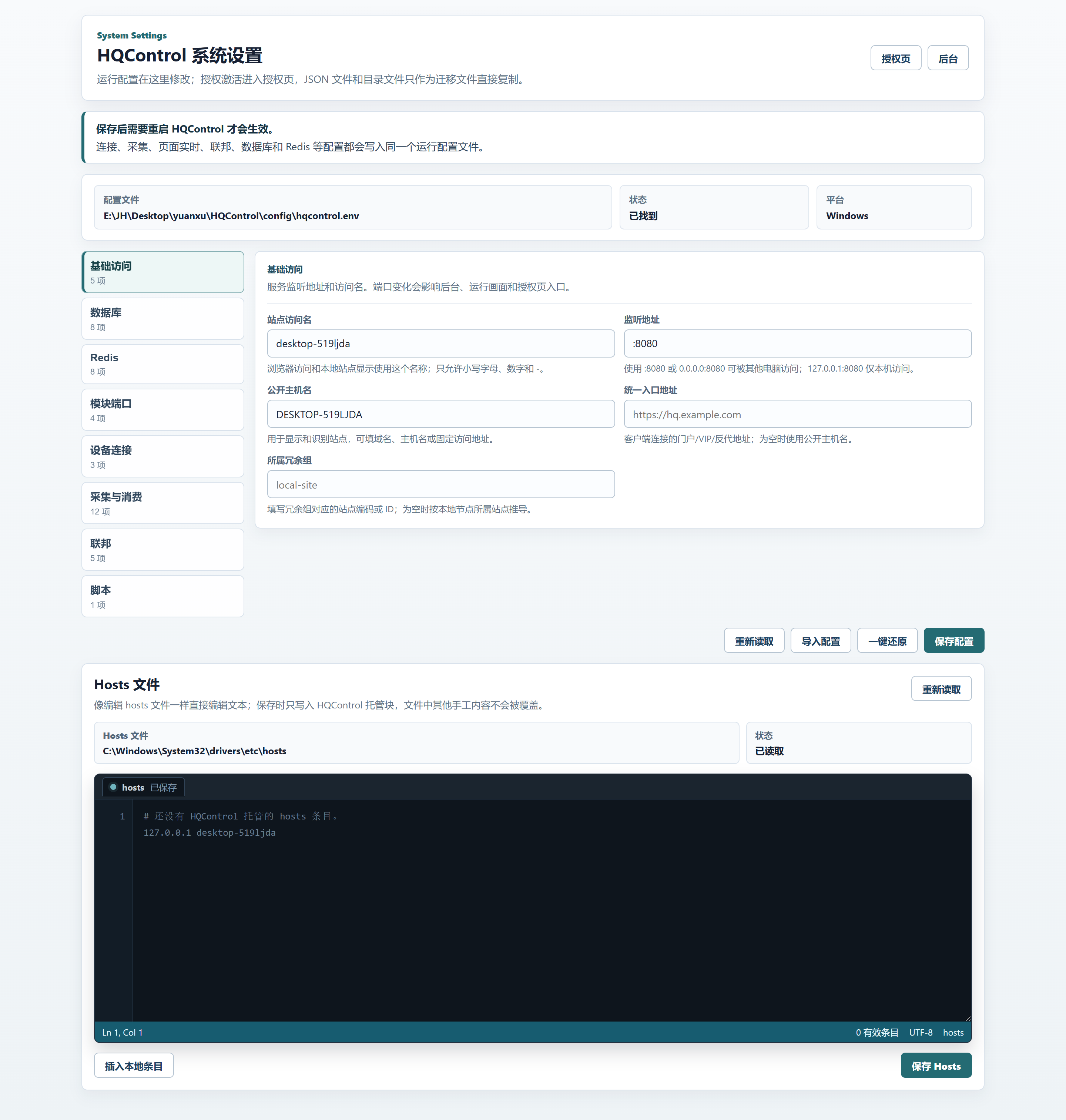
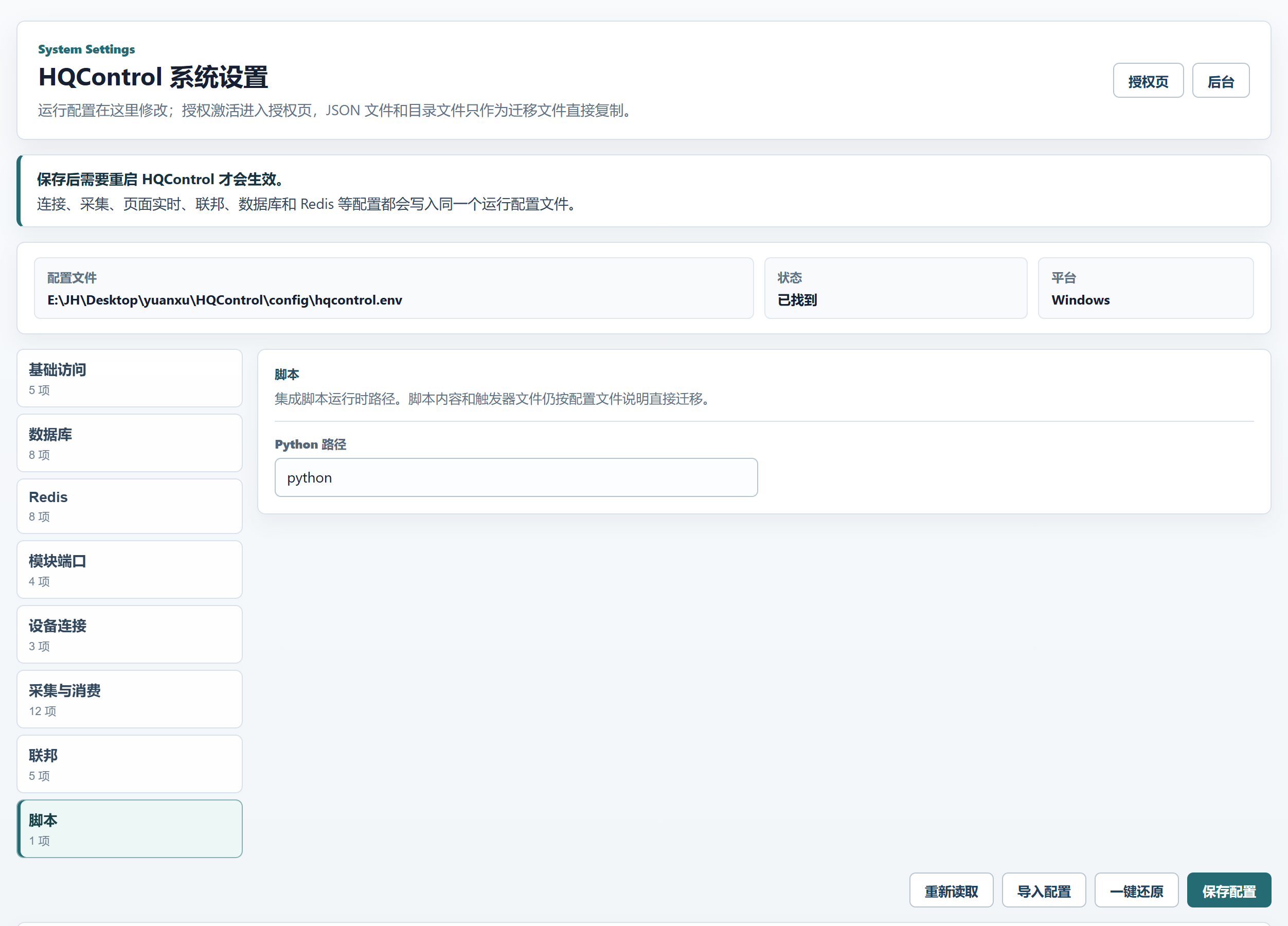
System Settings is only for HQControl host runtime configuration. Connection, collection, page realtime, federation, database, and Redis settings are written to the same runtime config file. Use the license page for activation. JSON files and folders are copied directly for migration. Restart HQControl after saving for changes to take effect.
Start at the door: entry, permission, and the restart rule
System Settings is HQControl's main runtime switchboard. It does not edit screen content; it decides how HQControl runs: which database it connects to, what address it exposes, and how fast collection should move. Open the HQControl address in a browser and add /settings (local: http://127.0.0.1:8080/settings). First check the three status tiles at the top: which hqcontrol.env this change writes to, whether the file was found, and whether the machine is Windows or Linux. That confirms you are changing the right host and the right file. Permissions are clear: local access can open it directly; remote access requires the top administrator; read-only accounts can view but not save. Keep the hard rule in mind: changes here take effect only after HQControl restarts. No restart means no real change.
- Local address:
http://127.0.0.1:8080/settings.
- Remote address:
http://server-ip:8080/settings, after signing in as the highest administrator.
- Restart HQControl after saving for changes to take effect; the page shows the restart command for the current platform.
- Read-only accounts can view but not save. For delivery, record who changed what, when, and why.
Read the map first: 8 groups, 8 places for settings
The left rail is the real map of this page: Access, Database, Redis, Module Ports, Device Connection, Collection Consumers, Federation, and Scripts. Before changing a field, confirm which group owns it, the same way you trace a cabinet circuit before touching a terminal. This page is for host runtime configuration, not content editing. Ports, database settings, and script runtime paths belong here, not in menus, popup templates, or screen files.
Access (5 items): Service listen address and access name. Port changes affect admin, runtime screens, and the license page.Database (8 items): PostgreSQL connection settings. Production sites should keep database-required enabled to avoid starting without history or alarms.Redis (8 items): Redis is used for cache, cross-instance messages, and realtime distribution. Windows installs use the HQControlRedis service by default.Module Ports (4 items): External modules listen on loopback only. Restart HQControl after port changes; startup logs will show the configured module addresses.Device Connection (3 items): Defaults for newly created devices. Individual devices can still override these values.Collection Consumers (12 items): The IO Worker collects PLC/OPC data into tag_latest. Pages, trends, and alarms consume that latest state instead of polling PLCs again.Federation (5 items): Remote-site shared key, heartbeat, route refresh, and HTTP timeout. Federated nodes must use the same federation shared key.Scripts (1 item): Integration script runtime path. Script contents and trigger files are still migrated as files.
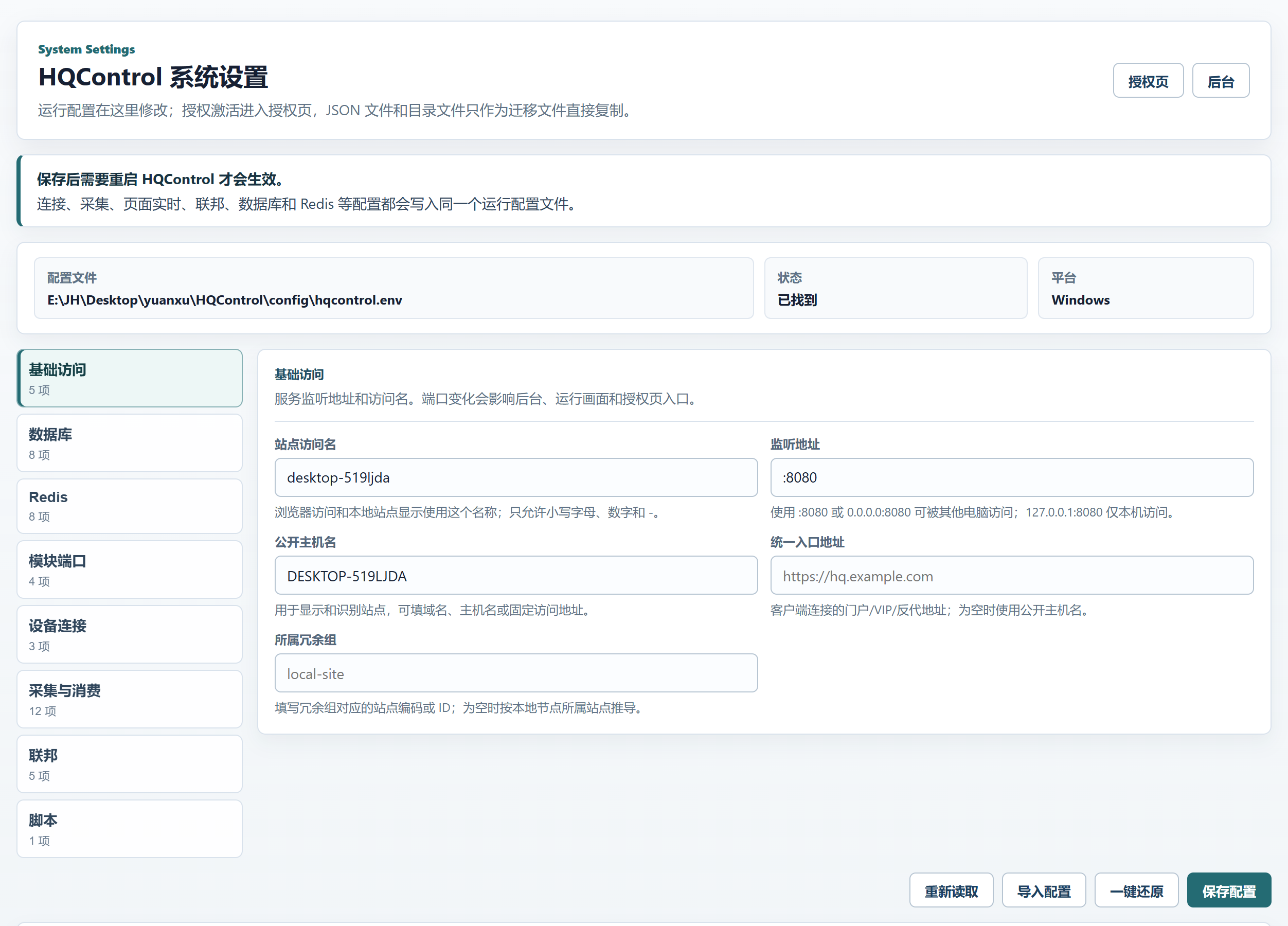
Access: give users the right door and the host the right nameplate
Access decides where the browser enters HQControl and whether admin, runtime screens, and the license page all point to the same host. Listen Address is the actual bind address and port. Site Access Name, Public Host, Unified Entry Address, and Redundancy Group are the host's nameplate across local access, reverse proxy, VIP, and federation scenarios. Single-machine testing usually stays at the defaults. Fill real domain names, fixed IPs, VIPs, or reverse-proxy addresses only when the site actually uses them.
Site Access Name: Use this name for browser access and local site display. Only lowercase letters, numbers, and - are allowed.Listen Address: Use :8080 or 0.0.0.0:8080 for access from other PCs; 127.0.0.1:8080 is local only.Public Host: Used to display and identify this site. Use a domain, host name, or fixed access address.Unified Entry Address: the portal/VIP/reverse-proxy address used by clients; when empty, HQControl uses Public Host.Redundancy Group: the site code or ID for the redundancy group; when empty, HQControl derives it from the local node site.
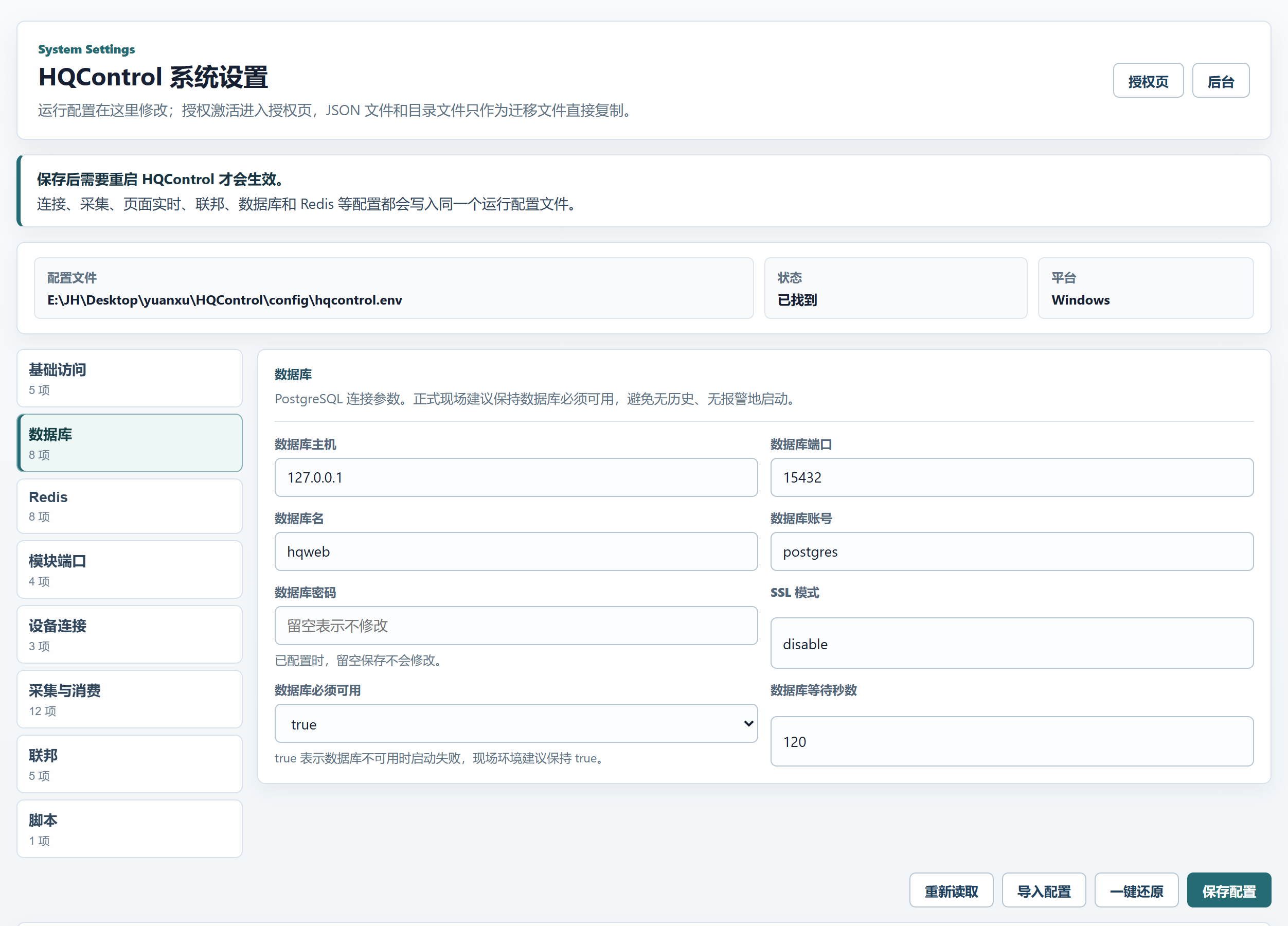
Database: let PostgreSQL stand up before HQControl runs
The Database group is only for PostgreSQL connection settings. With the bundled database, the defaults are usually the safest answer. When switching to an existing site database, fill Database Host, Database Port, Database Name, Database User, Database Password, SSL Mode, Database Required, and Database Wait Seconds. Production sites should keep Database Required set to true: if the database is down, HQControl should fail startup instead of running quietly without history or alarms.
- An empty password field means keep the current password, not clear it.
Database Wait Seconds is the startup wait for PostgreSQL readiness; do not lower it casually on bundled-database or slow-start machines.SSL Mode follows the site database requirement. Bundled databases usually stay at the default.- Public manuals never carry real accounts or passwords; hand them over separately at delivery.
- The database port is an internal service and must not be exposed to the public network.
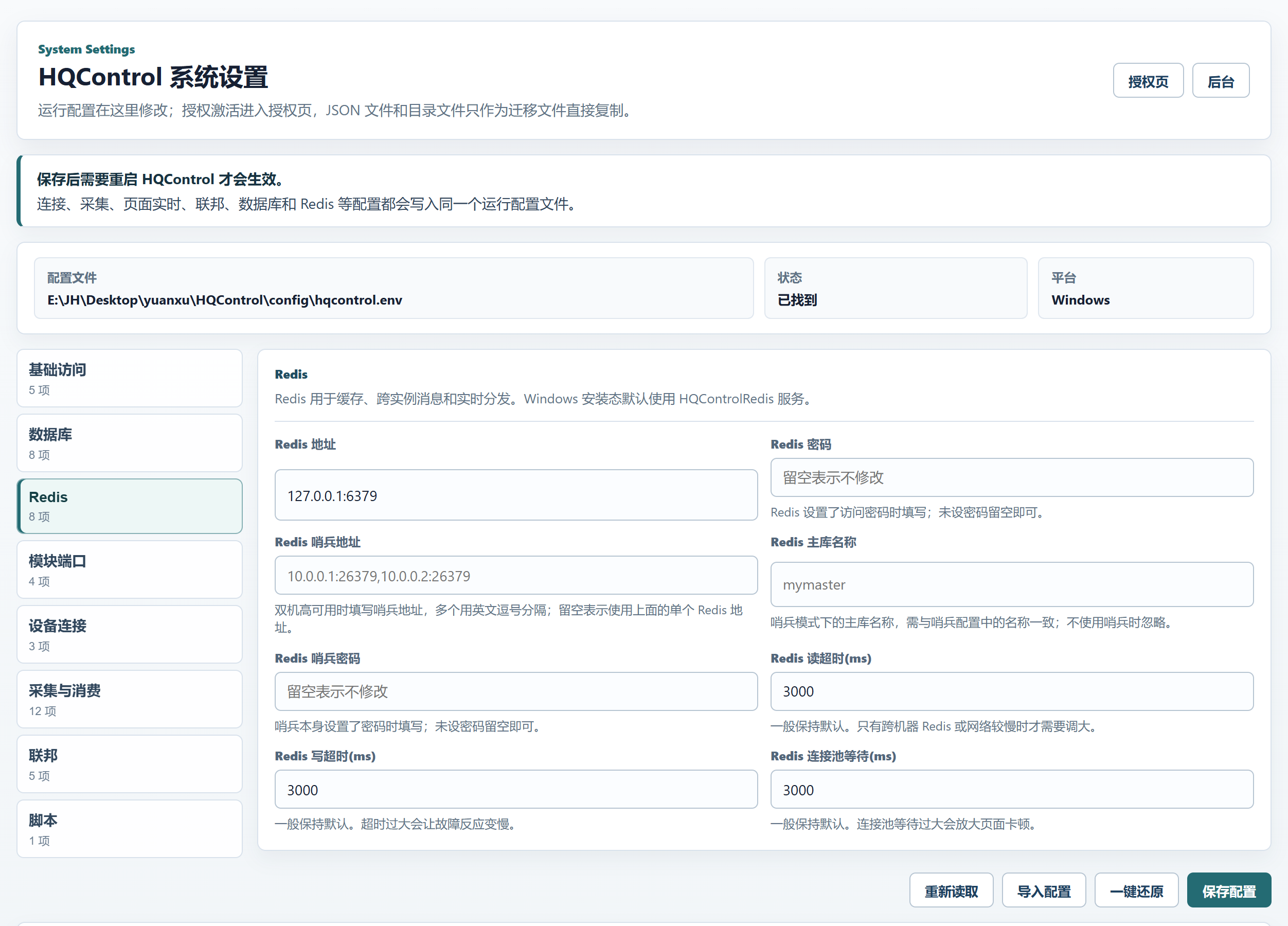
Redis: more than cache, it carries realtime distribution
Do not read this group as just ordinary cache. Redis also carries cross-instance messages and realtime distribution. Windows installs use the HQControlRedis service by default, so single-machine projects normally stay at defaults. Fill the 8 Redis fields only when Redis is remote, sentinel-based, or protected by Redis or sentinel passwords. Do not stretch timeouts by feel; larger values make faults surface later and pages wait longer.
Redis Address is the normal single-instance connection; if sentinel is not used, this is usually the only address field you fill.Redis Password is left empty when no password is configured; when already configured, leaving it blank does not change it.Redis Sentinel Addresses are comma-separated. Leave them empty to use the single Redis address above.Redis Master Name must match the sentinel master name; ignore it when sentinel is not used.Redis Sentinel Password is only for password-protected sentinel itself.Redis Read Timeout (ms), Redis Write Timeout (ms), and Redis Pool Wait (ms) usually stay at defaults. Increase them only for remote Redis or slow networks.
Module Ports: local service lines, not outside entrances
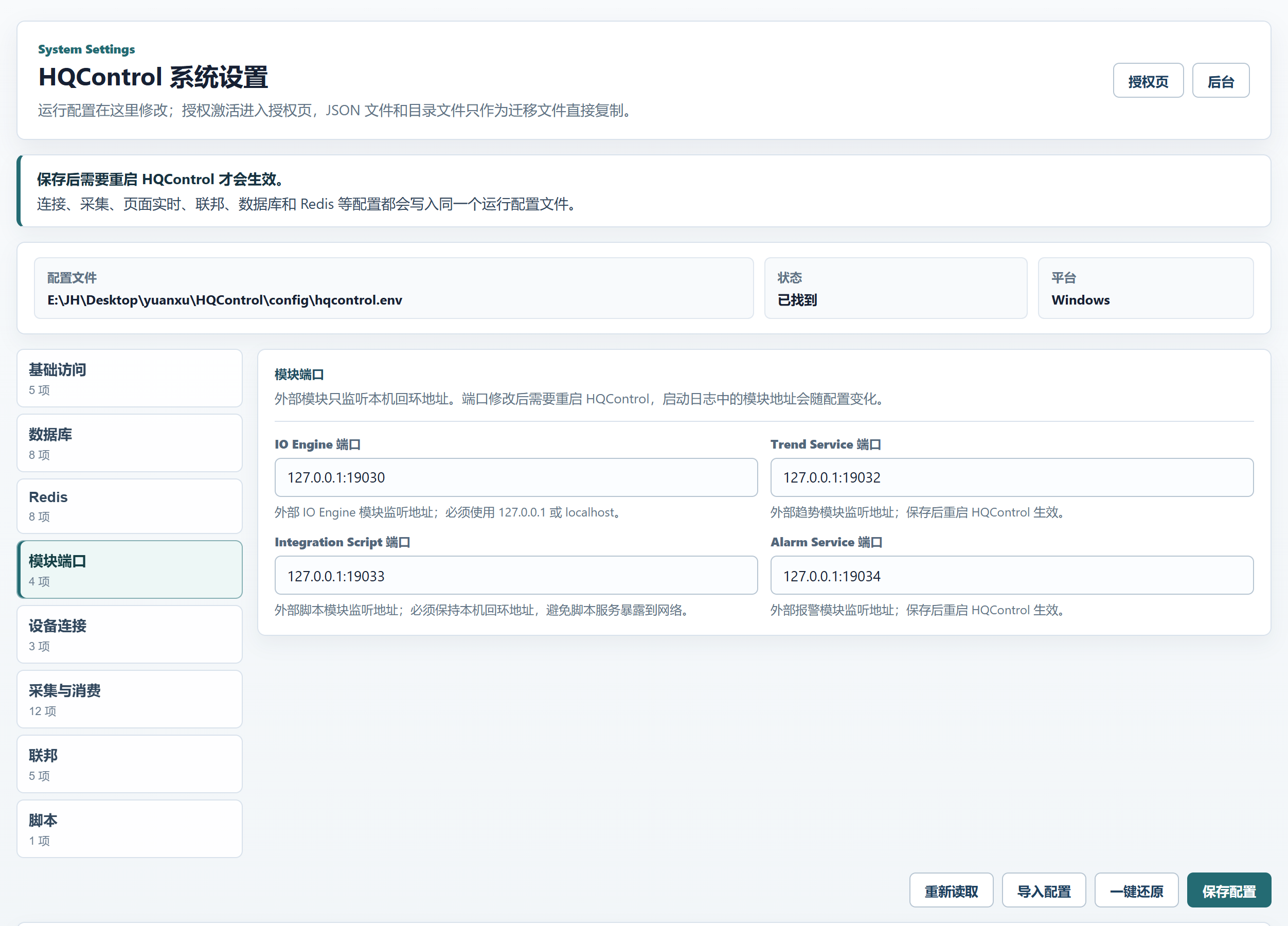
Module Ports is a new group for the loopback listen addresses of IO Engine, Trend Service, Integration Script, and Alarm Service. Treat them as local service lines between modules: the HQControl main process and local external modules use them to find each other. They are not entry points for browsers, clients, or the public network. After changing a port, restart HQControl and check the startup logs to confirm the module address actually changed.
IO Engine Port: External IO Engine listen address; use 127.0.0.1 or localhost.Trend Service Port: External trend service listen address. Restart HQControl to apply changes.Integration Script Port: External script service listen address. Keep it on loopback so the script runner is not exposed to the network.Alarm Service Port: External alarm service listen address. Restart HQControl to apply changes.- Before changing a port, confirm another local program is not using it. After restart, check startup logs for the actual module addresses.
Device Connection: defaults for new devices, not a site-wide workaround
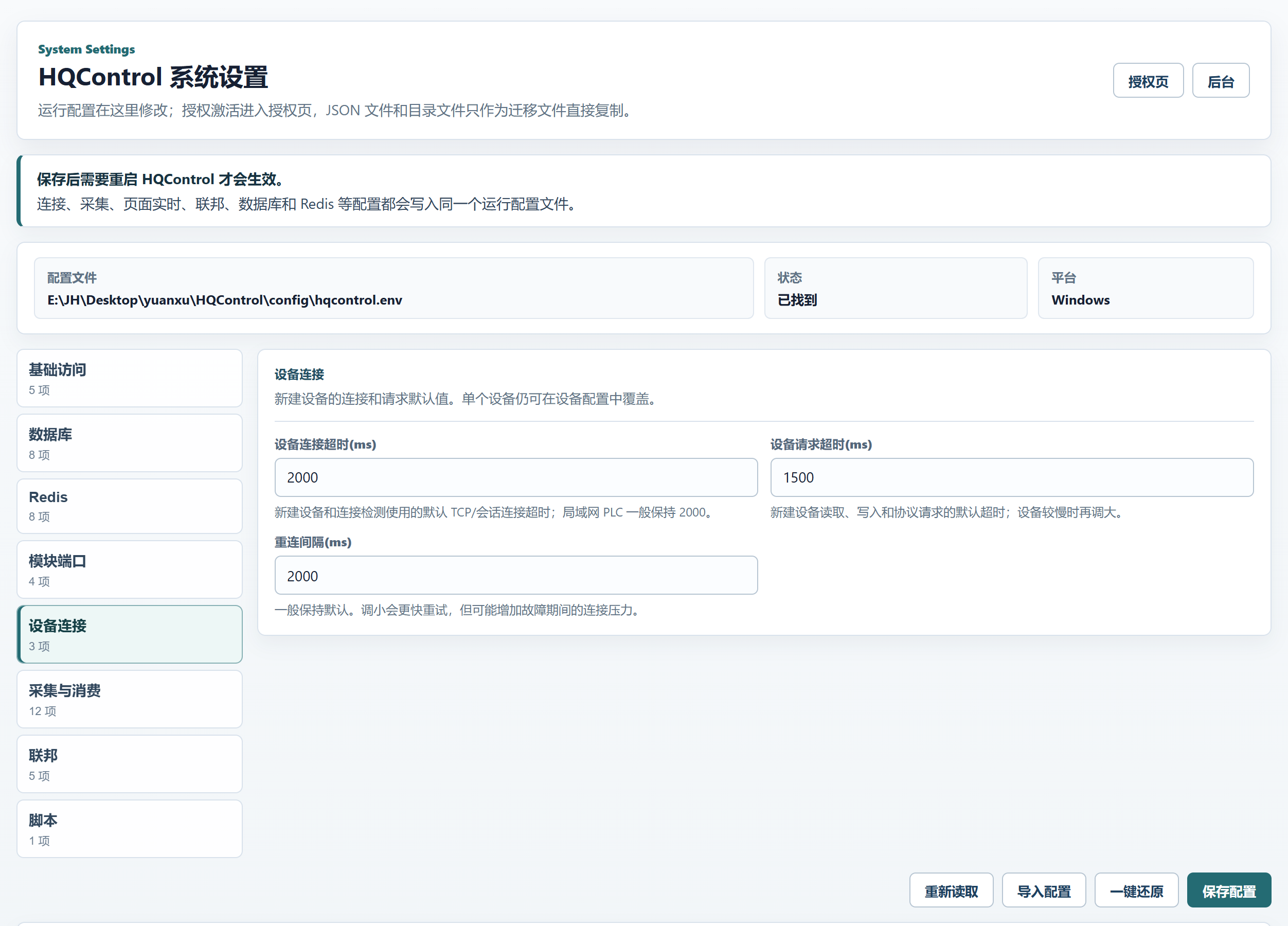
Device Connection has 3 fields for the default TCP/session behavior of newly created devices and connection probes. Existing per-device settings are not forcibly overwritten by global defaults. If one PLC is unusually slow, tune that device first instead of inflating timeout and reconnect behavior for the entire site.
Device Connect Timeout (ms): Default TCP/session connect timeout for new devices and probes. LAN PLCs usually stay at 2000.Device Request Timeout (ms): Default timeout for new device reads, writes, and protocol requests. Increase only for slower devices.Reconnect Interval (ms): Keep the default. Smaller values retry faster but add pressure during faults.
Collection Consumers: understand the pipeline before tuning
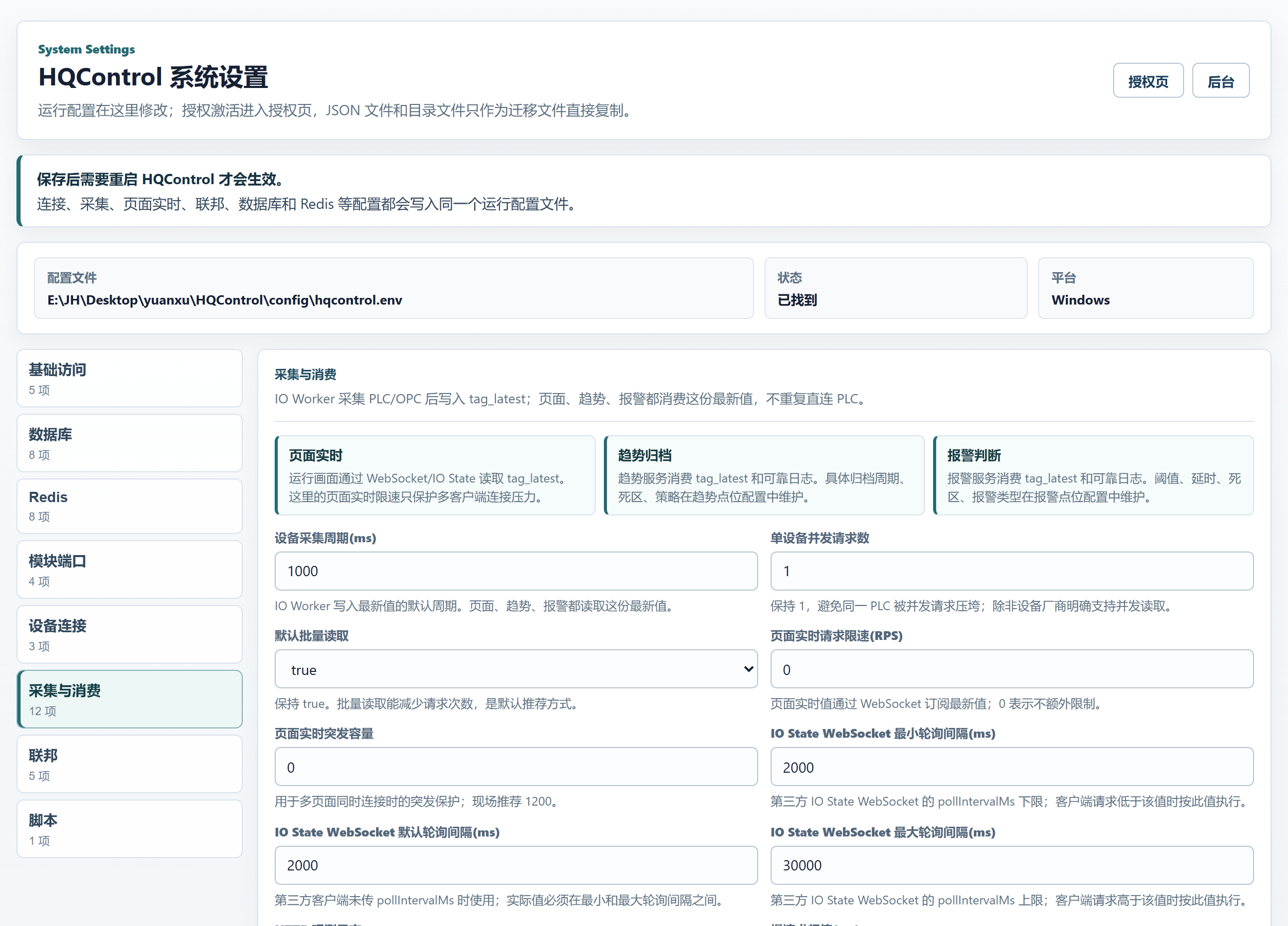
This 12-field group is the easiest place to break things with good intentions. Learn the pipeline first: the IO Worker collects PLC/OPC data and writes the latest values into tag_latest; runtime pages, trends, and alarms read that latest state and the reliable journal instead of connecting to the PLC again. Once that is clear, the tuning boundary is clear too: realtime page limits, IO State WebSocket polling bounds, and HTTP Observe Logs protect consumer-side pressure. They do not directly change the PLC collection rhythm.
Device Collection Period (ms) is the default period for the IO Worker to write latest values. For large-tag projects, optimize grouping and batch reads before lowering it.Per-Device Concurrent Requests should stay at 1 unless the vendor explicitly supports concurrent reads to the same PLC.Batch Reads By Default should stay true. Batch reads reduce request count and are recommended.Realtime Page Limit (RPS) and Realtime Page Burst protect multi-client pressure. They do not change the IO Worker collection period.IO State WebSocket Min/Default/Max Poll Interval (ms) sets the bounds for third-party IO State WebSocket pollIntervalMs.HTTP Observe Logs is off by default. When enabled, only slow requests, large responses, errors, or sampled requests are logged for long-run diagnosis.
Federation: match the shared key before tuning heartbeat
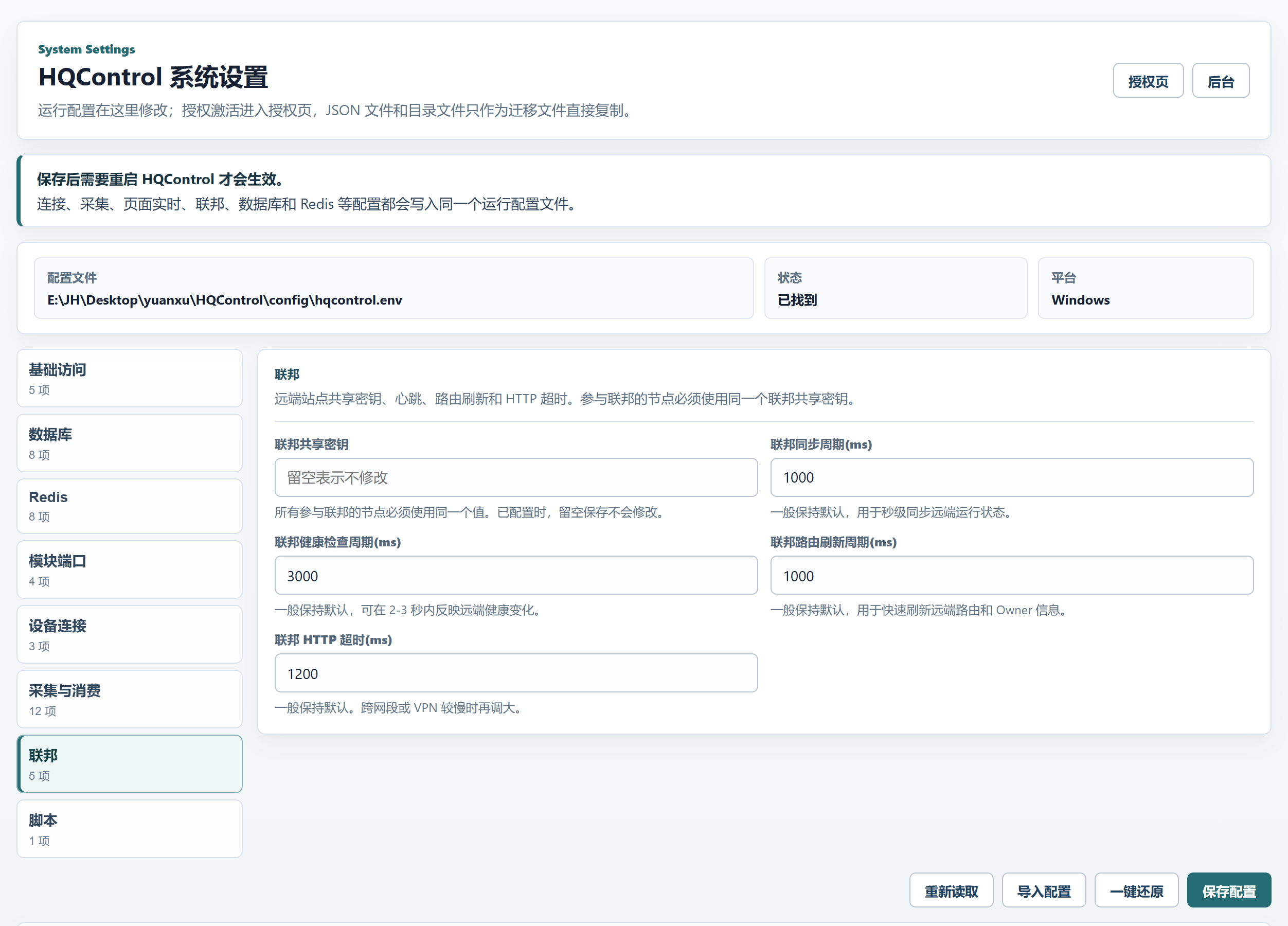
Federation manages the remote-site shared key, heartbeat, route refresh, and HTTP timeout. Single-machine projects usually leave it alone. In multi-site, redundancy, or cross-subnet deployments, first confirm every federated node uses the same Federation Shared Key. If the key does not match, heartbeat, routing, and Owner information will not be stable. After the key is confirmed, tune sync and timeout values around the real network latency.
Federation Shared Key: All federated nodes must use the same value. When already configured, leaving this blank will not change it.Federation Sync Period (ms): Keep the default for second-level remote runtime state sync.Federation Health Period (ms): Keep the default to reflect remote health changes within 2-3 seconds.Federation Route Period (ms): Keep the default to refresh remote route and owner information quickly.Federation HTTP Timeout (ms): Keep the default. Increase for slow cross-subnet or VPN links.
Scripts: the release package owns the formal interpreter
Formal Integration Script execution uses the verified Python interpreter and locked dependencies in the release package. Python Path is not a production interpreter-replacement entry; an existing compatibility setting, even when visible, does not change the formal executor. Maintain script content, triggers, and managed connectors in the Integration Script workbench.
- Do not configure system Python, per-script Python, or a venv as the formal runtime.
- Add dependencies through the audited, locked, built, and verified release process.
- Use module status, diagnostics, and script records to verify runtime readiness.
Import, Restore, and Hosts: maintenance tools, not extra groups
The buttons at the bottom and lower right are maintenance actions, not a ninth group. Import Config reads .env-style text, fills supported fields into the form, and says Imported configuration filled the form. Review it, then save. Restore Defaults returns runtime settings to their defaults and still requires an HQControl restart. Hosts File lets you edit the hosts text directly. Saving updates only the HQControl managed block; other manual hosts entries are preserved. These tools are useful in diagnosis, but use them with a backup and a review step.
Import Config supports normal KEY=value and export KEY=value lines. Review imported values before saving.Restore Defaults asks for confirmation and is useful after diagnosis. Do not click it casually without a backup of site parameters.Insert Local Entry inserts a local hosts entry in the form 127.0.0.1 <site-access-name> based on the current Site Access Name.Save Hosts updates only the HQControl managed block and does not overwrite other lines maintained manually in the hosts file.
Writing + screenshot standard for the rest of the site
Use this section as the model for the rest of the manual refresh: first say when to change a setting and when not to, then explain fields in real UI order, then finish with delivery and troubleshooting notes. Screenshots follow the same standard: every image must be a current high-resolution UI screenshot, the image title names the UI object, and the caption explains what the reader should decide from it. The copy should not stay abstract, and the image should not be decorative. After reading, the user should know what to do next and what to avoid.
- Writing: use real page groups and field names. The English version carries the same information as Chinese without adding extra steps.
- Structure: one card solves one problem. Start with the conclusion, then field explanation and cautions.
- Screenshots: image order follows page order. The Chinese and English sections must have the same image count, order, and
src values.
- Image paths: store screenshots under the product directory and use stable English kebab-case file names without spaces or URL encoding.
- Image text:
alt describes the screen, title names the object, and caption states the use or risk. Do not replace real UI screenshots with decorative images.