IO State API: authorization, exact reads, and streaming
Prepare an IO State-enabled HTTPS URL, healthy Tags, and an io:manage account. Clients read collected state; the API neither polls PLCs nor provides writes, alarms, or historical trends.
Developer tutorial
Developer tutorial: IO State API: authorization, exact reads, and streaming
Create a Profile and Access Key, read SignalRefs, obtain a single-use Ticket, and subscribe through WebSocket.
Prerequisites and responsibility
Prepare an IO State-enabled HTTPS URL, healthy Tags, and an io:manage account. Clients read collected state; the API neither polls PLCs nor provides writes, alarms, or historical trends.
Copy hq://io/... SignalRefs from the catalog; derived bits use hq://io-bit/.... Display names are not stable identities.
Calculated Tags are outside this IO State V2 SignalRef scope; use the dedicated calculated-value consumer interface.
Access Keys are server-side client credentials. Keep them out of public HTML, logs, screenshots, and shared code. Runtime custom pages use the page SDK.
1. Create a Profile for one signal
A Profile defines delivered signals. Start with one good-quality physical Tag’s full SignalRef.
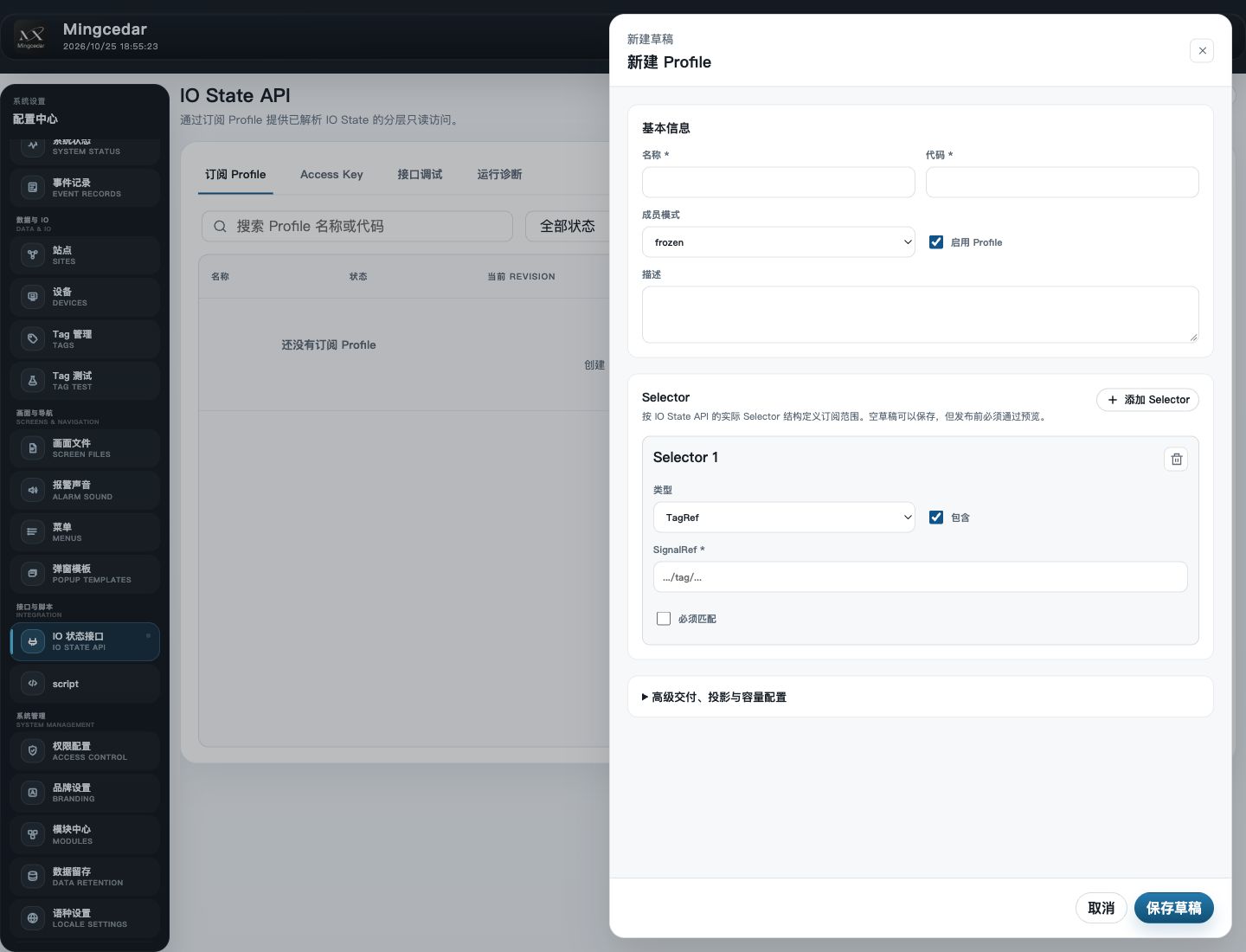
Open IO State API → Subscription Profiles and click New Profile.
Set Name to Equipment Status, Code to equipment_status, Membership mode to frozen, and check Enable Profile.
Click Add Selector and choose tagRef. Check Include and Required, then paste the complete hq://io/... URI into SignalRef.
For this single-signal exercise, keep the default advanced delivery, projection, and limits. Click Save draft.
Select the saved Profile row and click Preview in its details.
Expected result Preview resolves one signal and permits publication; drafts cannot be subscribed to.
If the result differs
Zero resolved signals or a required-match failure: check the complete SignalRef against the available catalog; do not replace UUIDs with display names.
Cannot publish: read the preview findings, correct the selector, save, and preview again.
2. Publish the Profile and confirm its Revision
Publication uses the saved, previewed draft. Revision identifies the exact version a client subscribes to.
Click Publish Revision below the passing preview.
Confirm that the dialog shows one signal, then publish.
In details, verify Published status and a Current Revision value. Open Revision history to inspect the new record.
Record the Profile code and Revision. The client query below returns its Profile ID; code and ID are not interchangeable.
Expected result A Revision is published. If another user changes the draft, refresh and preview again; do not override the conflict.
3. Generate an Access Key for the client
An Access Key identifies the caller. Create the credential here, then configure V2 authorization in the next step.
Use X-IO-State-Key, not a Portal administrator login Token.
Available Profiles include id, revision, resolvedCount, membershipHash, streamAllowed, and adHocReadAllowed. Check the mode flags.
Specified revision, count, and sequence fields are decimal strings. Avoid conversion to a potentially lossy JavaScript Number.
Open Access Keys and click Create Access Key. Set Client name to Equipment Reporting.
Set the required expiration, check Enable now and Allow ad-hoc reads, and use Concurrent stream limit 1.
Choose Selected scope, select Tags, enter the same target as device-code.tag-code, and click Add scope. The creation form requires at least one scope item. Do not enter the hq:// URI or choose All IO State here.
Confirm that only the intended Tag is listed. After creation, bind the Profile and add its UUID-based V2 native Scope in the next step; the dotted code in this form does not replace V2 authorization.
Click Generate Key. Copy the full key while it is visible and store it in the client’s credential store.
Expected result The client is enabled and the full key saved; a key hint cannot authenticate requests.
4. Bind the Profile and add a native TagRef Scope
With All IO State off, signals must be in both the bound Profile and a native Scope; Profile binding alone grants no scope.
Select Equipment Reporting in the ledger, find V2 authorization, and click Edit V2 authorization.
Check Equipment Status under Subscription Profiles.
Under Native TagRef Scopes, select Tag and enter the SignalRef’s IO Domain UUID, Device UUID, and Tag UUID from the catalog. Use identities, not codes.
Click Add and confirm the Scope appears in the list, then click Save V2 authorization.
After closing the editor, verify one bound Profile and one native Scope, with identities matching the target Tag.
Expected result The key has both the Profile binding and a single-Tag Scope. Changing authorization stops its existing streams; clients must reconnect.
If the result differs
Zero native Scopes: values may have been entered without clicking Add. Add the Scope and save.
Profile listed but read denied: check the three Scope identities and Allow ad-hoc reads before changing the scope.
5. Create the external client folder
Keep these files on the client computer or container, outside Integration Script. The launcher prompts for the URL and key without echoing the key.
Create an io-client folder on the external client and save the code below as run_io_client.py.
Save the next section’s read code as io_read.py in the same folder. Match filenames exactly without a .txt extension.
Open a terminal in that folder and run python run_io_client.py. On Windows with the py launcher, use py -3 run_io_client.py.
Enter the actual HTTPS root URL and full Access Key. The launcher lists this key’s Profiles, IDs, revisions, and permission flags.
Enter read at the Mode prompt, then paste the complete SignalRef matching the Scope.
Expected result The Profile list contains the Equipment Status record. The read exercise needs adHocReadAllowed; streaming needs streamAllowed. Output does not contain the full key.
6. Save the read program and inspect the response
Save io_read.py beside run_io_client.py and launch read mode. The launcher sets variables and calls main(); only the standard library is required.
io_read.pyPython
# External client: io_read.py (standard library only)import jsonimport osfrom urllib.request import Request, urlopenBASE_URL = os.environ["HQCONTROL_URL"].rstrip("/")ACCESS_KEY = os.environ["HQCONTROL_IO_KEY"]SIGNAL_REF = os.environ["HQCONTROL_SIGNAL_REF"]def main(): request = Request( BASE_URL + "/api/v2/integration/io-state/read", data=json.dumps({"signalRefs": [SIGNAL_REF], "include": ["metadata"]}).encode(), headers={"X-IO-State-Key": ACCESS_KEY, "Content-Type": "application/json"}, method="POST", ) with urlopen(request, timeout=10) as response: result = json.load(response) if result.get("type") != "io_state_read" or len(result.get("items", [])) != 1: raise RuntimeError("Unexpected read response") item = result["items"][0] if item.get("quality") != "good" or "state" not in item: raise RuntimeError("Signal unavailable: " + item.get("qualityDetail", "unknown")) state = item["state"] typed = state["value"] # Preserve int64 / uint64 / decimal strings; do not convert them to float. print(json.dumps({"signalRef": item["signalRef"], "kind": typed["kind"], "value": typed["value"], "quality": state["quality"], "observedAt": state["observedAt"]}, ensure_ascii=False))if __name__ == "__main__": main()
Expected result Output includes signalRef, kind, value, quality=good, and observedAt. Compare it with Tag Test for the same time period.
Request and response fields
POST /api/v2/integration/io-state/read takes 1–1000 signalRefs and optional include:["metadata"]. The response type is io_state_read; items preserves input order. HTTP success does not imply every signal is good.
Each item contains signalRef, quality, and qualityDetail. state can be absent when no value is available.
state.value is {kind, value}, not a raw number. Preserve string representations for int64, uint64, and decimal precision.
Inspect quality, observation/server timestamps, version, and source. Do not turn missing, stale, pending, or unavailable into zero.
Expect the console SignalRef, type, value, good quality, and observation time to agree with workbench diagnostics.
7. Install the client dependency and observe the stream
Complete the read exercise first. This program observes frames without maintaining a production cache or embedding the Access Key in code.
In the same Python environment used by the client, run python -m pip install "websocket-client==<approved-version>" after replacing the version. Use the earlier Wheel preparation procedure for an offline client.
Save the code below as io_stream.py beside the other client files.
Run python run_io_client.py again, enter the URL and key, and note the target Profile id and revision in its response.
Enter stream for Mode and the returned id for Published Profile ID, not the code equipment_status.
Observe subscription_ready, snapshot_begin, snapshot_chunk, snapshot_end, then heartbeat or io_state_delta. Stop with Ctrl+C.
io_stream.pyPython
# External client: io_stream.py. Install the approved websocket-client package.# This diagnostic prints the stream lifecycle; it is not a production state cache.import jsonimport osfrom urllib.parse import urlencodefrom urllib.request import Request, urlopenimport websocketBASE = os.environ["HQCONTROL_URL"].rstrip("/")KEY = os.environ["HQCONTROL_IO_KEY"]PROFILE = os.environ["HQCONTROL_PROFILE_ID"]USER_AGENT = "Mingcedar-Tutorial/1.0"def request_json(path, body=None): headers = {"X-IO-State-Key": KEY, "User-Agent": USER_AGENT} data = None if body is not None: headers["Content-Type"] = "application/json" data = json.dumps(body).encode() with urlopen(Request(BASE + path, data=data, headers=headers), timeout=10) as response: return json.load(response)def main(): if not BASE.startswith("https://"): raise ValueError("Use the configured HTTPS server URL") profiles = request_json("/api/v2/integration/io-state/profiles")["items"] profile = next(item for item in profiles if item["id"] == PROFILE) ticket = request_json("/api/v2/integration/io-state/stream-tickets", { "profileId": profile["id"], "expectedRevision": profile["revision"], "clientCapabilities": {"maxSignals": 1000, "maxFrameBytes": 1048576, "maxUpdatesPerSecond": 1000}, }) address = "wss://" + BASE[len("https://"):] + "/api/v2/integration/io-state/subscribe?" + urlencode({"ticket": ticket["ticket"]}) connection = websocket.create_connection(address, timeout=30, suppress_origin=True, header=["User-Agent: " + USER_AGENT]) stream = None previous = None try: while True: frame = json.loads(connection.recv()) identity = (frame["streamId"], frame["streamEpoch"]) sequence = int(frame["frameSeq"]) if stream is not None and (identity != stream or sequence != previous + 1): raise RuntimeError("Stream continuity lost; obtain a new ticket and snapshot") stream, previous = identity, sequence print(frame["type"], frame["frameSeq"]) if frame["type"] in ("reset_required", "error"): raise RuntimeError("Stream reset; review profile and authorization before reconnecting") finally: connection.close()if __name__ == "__main__": main()
Expected result Expect a complete snapshot and continuing heartbeats; no delta is normal when values are unchanged.
If the result differs
StopIteration: the entered ID is absent from the client-visible Profiles; check binding, publication, and the entered ID.
ModuleNotFoundError: websocket: install websocket-client using the same interpreter as the launcher.
Ticket failure or disconnect: end the diagnostic, inspect revision, authorization, and error code, then restart to request a new ticket.
Processing rules for realtime subscriptions
Frame order: subscription_ready → snapshot_begin → snapshot_chunk (one or more) → snapshot_end → io_state_delta / heartbeat. The example displays frames; production clients must maintain a cache as described below.
Ticket requests require profileId, expectedRevision, and clientCapabilities with maxSignals, maxFrameBytes, and maxUpdatesPerSecond. Match capacity to the actual Profile.
Tickets are single-use, expiring, and bound to IP/User-Agent. Do not log the Ticket URL; obtain a new Ticket after a failed connection.
A production client stages a snapshot by snapshotId, verifies chunkIndex order, chunks, items, complete, revision, and membershipHash, and replaces its active cache only after completion.
Verify streamId, streamEpoch, and contiguous frameSeq. Signal versions use domainEpoch/changeSeq to identify state generations.
Apply upsert/remove operations in io_state_delta. A heartbeat describes connection availability, not a new measurement. Latest-state delivery is not a lossless event log.
On reset_required, error, sequence gaps, membership changes, or disconnect, mark the old cache unavailable, close the connection, reconcile authorization/version, and use backoff before obtaining a new Ticket and complete snapshot.
Connection troubleshooting and recovery
Check authorization, signal scope, Profile revision, capacity, connectivity, and data quality in that order.
401: Key or Ticket missing/invalid/expired/consumed. Do not print credentials in error logs.
413: reduce request or Profile/frame capacity. 429: follow rate-limit guidance. 503/504: inspect service and source availability.
TLS: configure the correct CA trust and certificate-matching hostname; keep verification enabled.
For missing data, source loss, Key revocation, or Profile changes, show data as unavailable and handle reconnection. Old cached values must not remain marked live and good.
Figure 1: Configure a subscription Profile
Set the Profile name, code, and membership mode, then use Selectors to limit the shared signals. Preview the resolved signals before publishing.