
Windows 桌面版
Windows 场景使用桌面版选择共享目录、端口和绑定地址。配置默认保存在当前用户目录,适合工程电脑、维护电脑和短期现场共享。
Windows 场景使用桌面版选择共享目录、端口和绑定地址。配置默认保存在当前用户目录,适合工程电脑、维护电脑和短期现场共享。
Windows 场景使用桌面版选择共享目录、端口和绑定地址。配置默认保存在当前用户目录,适合工程电脑、维护电脑和短期现场共享。
桌面版可在关闭窗口时继续留在系统托盘运行,也可在当前 Windows 用户下启用开机自启。正式使用前确认共享目录、端口和访问网段。
Windows 桌面版可为当前用户添加资源管理器右键入口,便于从指定目录快速启动共享。右键入口只作用于当前 Windows 用户,不需要把整个系统目录开放为共享目录。
服务器或网关没有桌面环境时,可以使用无界面参数指定共享目录、端口和绑定地址。无界面运行适合配合 systemd、Supervisor 或现场统一进程管理工具。
Linux systemd 服务默认读取 /etc/hqshare/config.json。共享目录、端口、绑定地址、上传限制和用户账号都保存在这里。
Linux 安装脚本会创建 hqshare systemd 服务。需要关闭或恢复自启时只调整 systemd 启用状态,不会删除配置文件、共享目录或用户账号。
# Linux:启用开机自启
sudo systemctl enable hqshare

# Linux:关闭开机自启
sudo systemctl disable hqshare

# Linux:查看是否开机自启
sudo systemctl is-enabled hqshare使用 Linux 服务包里的 systemd 安装脚本部署。建议使用专用 hqshare 系统用户运行服务,不要用 root 直接运行文件服务。
cd linux-service
sudo ./install-linux-service.sh --share-path /srv/hqshare/public --port 5995 --bind 0.0.0.0

sudo /opt/hqshare/HQShare --config /etc/hqshare/config.json config set \
  --share-path /srv/hqshare/public \
  --port 6095 \
  --bind 192.168.1.10 \
  --max-upload-mb 1024
sudo systemctl restart hqshare安装后检查 systemd 状态、运行环境文件和配置文件。配置变更后重启服务,并用日志确认监听端口和共享目录。
sudo systemctl status hqshare
sudo journalctl -u hqshare -f
sudo cat /etc/hqshare/hqshare.env
sudo cat /etc/hqshare/config.json
sudo systemctl restart hqshare
sudo systemctl stop hqshare
sudo systemctl start hqshareLinux 服务版通过命令行入口管理账号。角色使用 viewer、operator、manager;新增、禁用、删除账号,或修改密码和角色后建议重启服务,让旧会话全部刷新。
sudo /opt/hqshare/HQShare --config /etc/hqshare/config.json user list
sudo /opt/hqshare/HQShare --config /etc/hqshare/config.json user add operator01 --password 'ChangeMe@2026' --role operator --display-name '现场操作员'
sudo /opt/hqshare/HQShare --config /etc/hqshare/config.json user update operator01 --role viewer
sudo /opt/hqshare/HQShare --config /etc/hqshare/config.json user reset-password operator01 --password 'NewPass@2026'
sudo /opt/hqshare/HQShare --config /etc/hqshare/config.json user update operator01 --disable
sudo /opt/hqshare/HQShare --config /etc/hqshare/config.json user update operator01 --enable
sudo /opt/hqshare/HQShare --config /etc/hqshare/config.json user delete operator01
sudo systemctl restart hqshare启动时会先检测端口。端口被占用时桌面版会提示建议端口;服务版修改配置文件里的端口后重启服务。
0.0.0.0 表示所有网卡都可访问;正式现场建议绑定具体内网 IP,再用防火墙限制来源。仅限本机访问时使用 127.0.0.1。
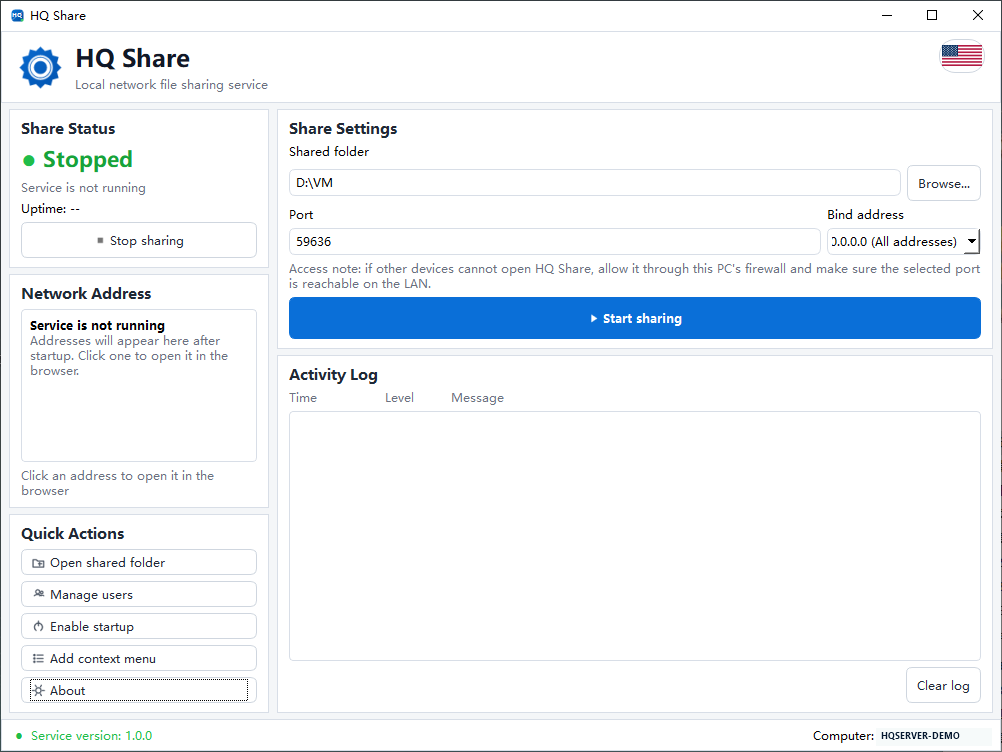
桌面版适合工程电脑和短期现场共享;固定运行场景再切换到 Linux systemd 或统一进程管理。